> ## Documentation Index
> Fetch the complete documentation index at: https://cubed3-feat-druid-driver-streaming.mintlify.site/llms.txt
> Use this file to discover all available pages before exploring further.
# Administration
> TODO
Cube is configured via [environment variables][link-env-vars] and
[configuration options][link-config] in a configuration file. Usually,
both would be used to configure a Cube deployment in production.
## Environment variables
Environment variables are mostly used for configuration that is defined
statically and is not supposed to change while a Cube deployment is running.
For example, [`CUBEJS_DATASOURCES`](/reference/configuration/environment-variables#cubejs_datasources) defines a list of data sources to connect
to; changing that list would require the deployment to restart.
See the [environment variables reference][link-env-vars] for all supported options.
See [this recipe][ref-env-var-recipe] if you'd like to reference environment variables
in code.
### Cube Core
You can set environment variables in any way [supported by
Docker][link-docker-env-vars], e.g., a `.env` file or the `environment`
option in the `docker-compose.yml` file.
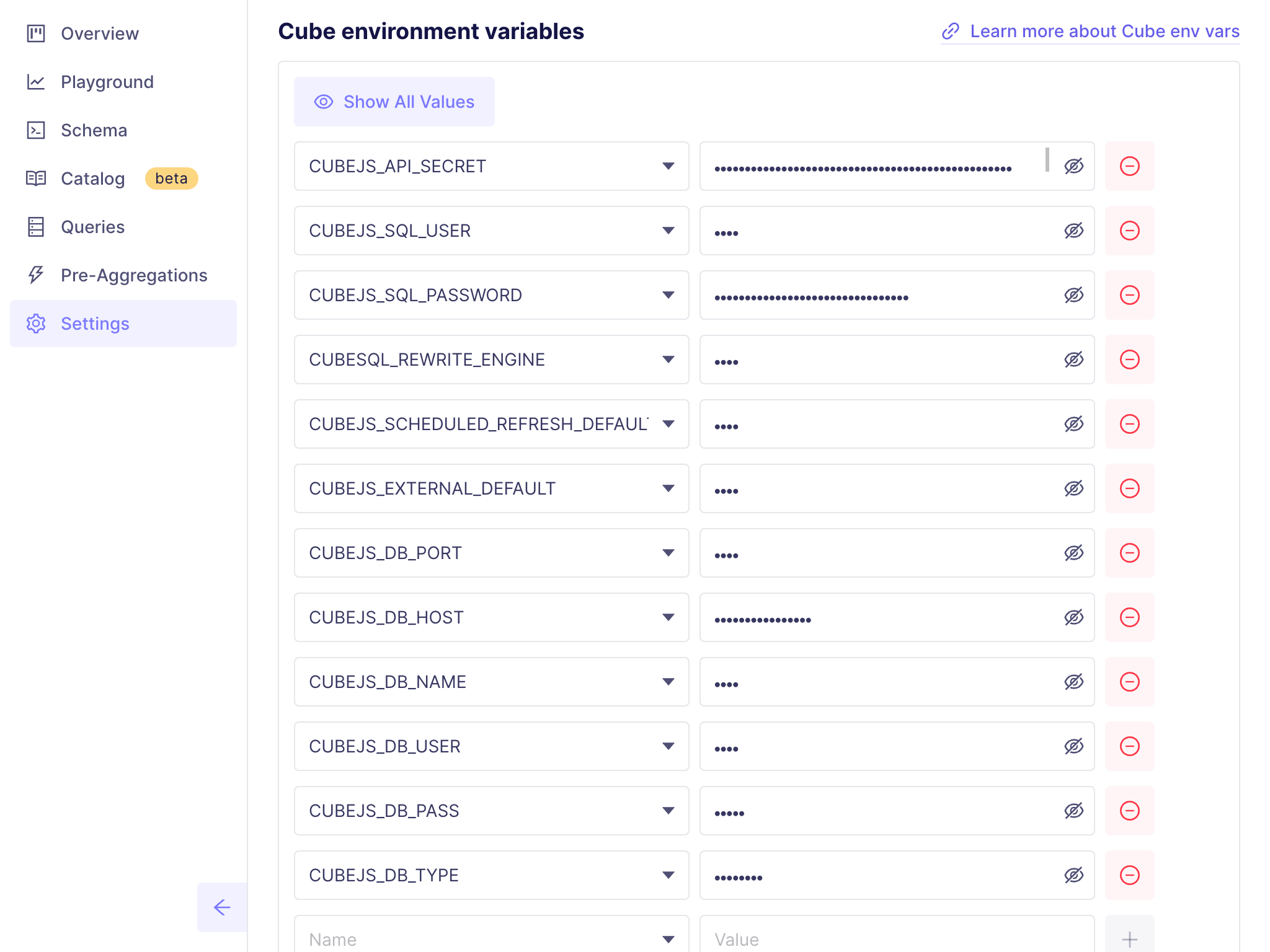
### Cube Cloud
You can set environment variables in **Settings → Configuration**:
 ## Configuration options
Configuration options are mostly used for configuration that is defined
programmatically and applied dynamically while a Cube deployment is running.
For example, [`query_rewrite`](/reference/configuration/config#query_rewrite)
provides a way to inspect, modify, or restrict every query that is being
processed by Cube.
Configuration options take precedence over environment variables.
See the [configuration options reference][link-config] for all supported options.
### `cube.py` and `cube.js` files
Configuration options can be defined either using Python, in a `cube.py` file,
or using JavaScript, in a `cube.js` file in the root folder of a Cube project.
```python title="Python" theme={null}
from cube import config
# Base path for the REST (JSON) API
config.base_path = '/cube-api'
# Inspect, modify, or restrict every query
@config('query_rewrite')
def query_rewrite(query: dict, ctx: dict) -> dict:
if 'order_id' in ctx['securityContext']:
query['filters'].append({
'member': 'orders_view.id',
'operator': 'equals',
'values': [ctx['securityContext']['order_id']]
})
return query
```
```javascript title="JavaScript" theme={null}
module.exports = {
// Base path for the REST (JSON) API
basePath: '/cube-api',
// Inspect, modify, or restrict every query
queryRewrite: (query, { securityContext }) => {
if (securityContext.order_id) {
query.filters.push({
member: 'orders_view.id',
operator: 'equals',
values: [securityContext.order_id]
})
}
return query
}
}
```
Both ways are equivalent; when in doubt, use Python.
Here is a minimal correct `cube.py` file. Note that the [`config`
object][ref-cube-package-config] must be imported:
```python theme={null}
from cube import config
# Configuration goes here...
```
Here is a minimal correct `cube.js` file. Note that the `module.exports` object must be defined:
```javascript theme={null}
module.exports = {
// Configuration goes here...
}
```
You can read more about [Python][ref-python] and [JavaScript][ref-javascript] support
in the dynamic data modeling section of the documentation.
### Cube Core
When using Docker, ensure that the configuration file and your [data model
folder][ref-folder-structure] are mounted to `/cube/conf` within the
Docker container.
### Cube Cloud
You can edit the configuration file by going into **Development Mode**
and navigating to **[Data Model][ref-data-model]** or **[Visual
Modeler][ref-visual-model]** pages.
## Runtimes and dependencies
Cube uses Python and Node.js as runtime environments for the code of
configuration and [dynamic data models][ref-dynamic-data-models]. You can look
current versions up on GitHub: [Python][link-current-python-version],
[Node.js][link-current-nodejs-version].
It's recommended to use `requirements.txt` and `package.json` files to
specify dependencies for your Python and JavaScript code, respectively.
### Cube Core
If you have specified Python packages in the `requirements.txt` file,
make sure to install them by running `pip install -r requirements.txt`
inside the Docker container.
If you have specified npm packages in the `package.json` file, make sure
to install them by running `npm install` inside the Docker container.
Alternatively, you can run `npm install` on your local machine and mount
the `node_modules` folder under `/cube/conf` in the Docker container;
however, if your dependencies contain native extensions, they might not work
when provided this way.
To automate the installation of dependencies, build and use a [custom
Docker image][ref-custom-docker-image].
### Cube Cloud
Cube Cloud automatically installs dependencies from `requirements.txt` and
`package.json` files.
## Development mode
Cube can be run in an insecure, development mode by setting the
[`CUBEJS_DEV_MODE`](/reference/configuration/environment-variables#cubejs_dev_mode) environment variable to `true`. Putting Cube in development
mode does the following:
* Disables authentication checks.
* Disables [member-level access control][ref-mls].
* Enables Cube Store in single instance mode.
* Enables background refresh for in-memory cache and [scheduled
pre-aggregations][link-scheduled-refresh].
* Allows another log level to be set (`trace`).
* Enables [Playground][link-dev-playground] on `http://localhost:4000`.
* Uses `memory` instead of `cubestore` as the default cache/queue engine.
* Logs incorrect/invalid configuration for `externalRefresh` /`waitForRenew`
instead of throwing errors.
[ref-folder-structure]: /docs/data-modeling/syntax#folder-structure
[link-config]: /reference/configuration/config
[link-dev-playground]: /docs/explore-analyze/playground
[link-env-vars]: /reference/configuration/environment-variables
[link-scheduled-refresh]: /reference/data-modeling/pre-aggregations#scheduled_refresh
[ref-dynamic-data-models]: /docs/data-modeling/dynamic
[ref-custom-docker-image]: /docs/deployment/core#extend-the-docker-image
[link-docker-env-vars]: https://docs.docker.com/compose/environment-variables/set-environment-variables/
[ref-mls]: /docs/data-modeling/access-control/member-level-security
[link-current-python-version]: https://github.com/cube-js/cube/blob/master/packages/cubejs-docker/latest.Dockerfile#L13
[link-current-nodejs-version]: https://github.com/cube-js/cube/blob/master/packages/cubejs-docker/latest.Dockerfile#L1
[ref-data-model]: /docs/data-modeling/data-model-ide
[ref-visual-model]: /docs/data-modeling/visual-modeler
[ref-python]: /docs/data-modeling/dynamic/jinja#python
[ref-javascript]: /docs/data-modeling/dynamic/javascript
[ref-cube-package-config]: /reference/data-modeling/cube-package#config-object
[ref-env-var-recipe]: /recipes/configuration/environment-variables
## Configuration options
Configuration options are mostly used for configuration that is defined
programmatically and applied dynamically while a Cube deployment is running.
For example, [`query_rewrite`](/reference/configuration/config#query_rewrite)
provides a way to inspect, modify, or restrict every query that is being
processed by Cube.
Configuration options take precedence over environment variables.
See the [configuration options reference][link-config] for all supported options.
### `cube.py` and `cube.js` files
Configuration options can be defined either using Python, in a `cube.py` file,
or using JavaScript, in a `cube.js` file in the root folder of a Cube project.
```python title="Python" theme={null}
from cube import config
# Base path for the REST (JSON) API
config.base_path = '/cube-api'
# Inspect, modify, or restrict every query
@config('query_rewrite')
def query_rewrite(query: dict, ctx: dict) -> dict:
if 'order_id' in ctx['securityContext']:
query['filters'].append({
'member': 'orders_view.id',
'operator': 'equals',
'values': [ctx['securityContext']['order_id']]
})
return query
```
```javascript title="JavaScript" theme={null}
module.exports = {
// Base path for the REST (JSON) API
basePath: '/cube-api',
// Inspect, modify, or restrict every query
queryRewrite: (query, { securityContext }) => {
if (securityContext.order_id) {
query.filters.push({
member: 'orders_view.id',
operator: 'equals',
values: [securityContext.order_id]
})
}
return query
}
}
```
Both ways are equivalent; when in doubt, use Python.
Here is a minimal correct `cube.py` file. Note that the [`config`
object][ref-cube-package-config] must be imported:
```python theme={null}
from cube import config
# Configuration goes here...
```
Here is a minimal correct `cube.js` file. Note that the `module.exports` object must be defined:
```javascript theme={null}
module.exports = {
// Configuration goes here...
}
```
You can read more about [Python][ref-python] and [JavaScript][ref-javascript] support
in the dynamic data modeling section of the documentation.
### Cube Core
When using Docker, ensure that the configuration file and your [data model
folder][ref-folder-structure] are mounted to `/cube/conf` within the
Docker container.
### Cube Cloud
You can edit the configuration file by going into **Development Mode**
and navigating to **[Data Model][ref-data-model]** or **[Visual
Modeler][ref-visual-model]** pages.
## Runtimes and dependencies
Cube uses Python and Node.js as runtime environments for the code of
configuration and [dynamic data models][ref-dynamic-data-models]. You can look
current versions up on GitHub: [Python][link-current-python-version],
[Node.js][link-current-nodejs-version].
It's recommended to use `requirements.txt` and `package.json` files to
specify dependencies for your Python and JavaScript code, respectively.
### Cube Core
If you have specified Python packages in the `requirements.txt` file,
make sure to install them by running `pip install -r requirements.txt`
inside the Docker container.
If you have specified npm packages in the `package.json` file, make sure
to install them by running `npm install` inside the Docker container.
Alternatively, you can run `npm install` on your local machine and mount
the `node_modules` folder under `/cube/conf` in the Docker container;
however, if your dependencies contain native extensions, they might not work
when provided this way.
To automate the installation of dependencies, build and use a [custom
Docker image][ref-custom-docker-image].
### Cube Cloud
Cube Cloud automatically installs dependencies from `requirements.txt` and
`package.json` files.
## Development mode
Cube can be run in an insecure, development mode by setting the
[`CUBEJS_DEV_MODE`](/reference/configuration/environment-variables#cubejs_dev_mode) environment variable to `true`. Putting Cube in development
mode does the following:
* Disables authentication checks.
* Disables [member-level access control][ref-mls].
* Enables Cube Store in single instance mode.
* Enables background refresh for in-memory cache and [scheduled
pre-aggregations][link-scheduled-refresh].
* Allows another log level to be set (`trace`).
* Enables [Playground][link-dev-playground] on `http://localhost:4000`.
* Uses `memory` instead of `cubestore` as the default cache/queue engine.
* Logs incorrect/invalid configuration for `externalRefresh` /`waitForRenew`
instead of throwing errors.
[ref-folder-structure]: /docs/data-modeling/syntax#folder-structure
[link-config]: /reference/configuration/config
[link-dev-playground]: /docs/explore-analyze/playground
[link-env-vars]: /reference/configuration/environment-variables
[link-scheduled-refresh]: /reference/data-modeling/pre-aggregations#scheduled_refresh
[ref-dynamic-data-models]: /docs/data-modeling/dynamic
[ref-custom-docker-image]: /docs/deployment/core#extend-the-docker-image
[link-docker-env-vars]: https://docs.docker.com/compose/environment-variables/set-environment-variables/
[ref-mls]: /docs/data-modeling/access-control/member-level-security
[link-current-python-version]: https://github.com/cube-js/cube/blob/master/packages/cubejs-docker/latest.Dockerfile#L13
[link-current-nodejs-version]: https://github.com/cube-js/cube/blob/master/packages/cubejs-docker/latest.Dockerfile#L1
[ref-data-model]: /docs/data-modeling/data-model-ide
[ref-visual-model]: /docs/data-modeling/visual-modeler
[ref-python]: /docs/data-modeling/dynamic/jinja#python
[ref-javascript]: /docs/data-modeling/dynamic/javascript
[ref-cube-package-config]: /reference/data-modeling/cube-package#config-object
[ref-env-var-recipe]: /recipes/configuration/environment-variables