> ## Documentation Index
> Fetch the complete documentation index at: https://cubed3-feat-druid-driver-streaming.mintlify.site/llms.txt
> Use this file to discover all available pages before exploring further.
# Evals
> Benchmark your agent's answers against a known-correct ground truth and track accuracy across data-model and agent changes.
Evals let you benchmark your agent's answers against a known-correct ground
truth, on any branch. You author a set of questions, each with the SQL or
[certified query](/admin/ai/certified-queries) that represents the right
answer, run your agent against them, and get a per-question pass/fail plus an
accuracy score for the run — so you can see, objectively, whether a data-model
or agent change made the agent better or worse.
You'll find evals in the model IDE under the **Evals** tab, with two
sub-tabs: **Evals** (runs) and **Questions** (the benchmark set).
 ## Concepts
| Term | What it is |
| -------------- | ------------------------------------------------------------------------------------------------------------------------------------------------------- |
| **Question** | A natural-language question plus its **ground truth** (the correct answer, as SQL or a certified-query reference). Authored as code in your data model. |
| **Eval (run)** | One execution of the agent against the whole question set, on a specific branch and agent. |
| **Result** | The agent's answer to a single question in a run, graded against that question's ground truth. |
| **Accuracy** | `passed / total` for a run, shown as `NN% (passed/total)`. |
## Authoring benchmark questions
Questions live in your [data model repository](/admin/ai#agent-configuration),
versioned and branched like the rest of it. You can keep them in a single
top-level `agents/eval_questions.yml` file — the simplest place to start — or
split them across any number of `agents/eval_questions/*.yml` files as your set
grows. The parser picks up both and merges every file's `eval_questions` list
into one set, so you can move from one file to many at any time without changing
anything else.
Each file has a top-level `eval_questions` list. A question needs a unique
`name`, a `question`, and exactly one ground truth: a `certifiedQuery`
reference **or** inline `sql`.
```yaml theme={null}
# agents/eval_questions.yml
eval_questions:
- name: revenue_by_quarter
question: What was our revenue by quarter over the last two years?
certifiedQuery: revenue_by_quarter # reference an existing certified query by name
- name: arr_last_4_years
question: What was our ARR over the last 4 years?
sql: | # ...or inline SQL ground truth
SELECT date_trunc('year', created_at) AS year, SUM(arr) AS arr
FROM subscriptions GROUP BY 1 ORDER BY 1
```
* `certifiedQuery` references a [certified query](/admin/ai/certified-queries)
by name. Define it under `agents/certified_queries/` (or via **Certify this
query** in chat). A reference that doesn't resolve to an existing certified
query is flagged as a validation error.
* `sql` is inline ground-truth SQL, run through the same Cube SQL API the agent
uses (so `MEASURE(...)` and friends work).
* Omitting both — or setting both — is a validation error.
* An optional top-level `space` key scopes a file's questions to a named space
(defaults to `auto`). Question names are unique per space.
The **Questions** tab is a read-only view of these files. To add or edit
questions, edit the YAML in the IDE — there's no in-product question editor
yet.
## Running an eval
On the **Evals** tab, click **Run eval** and choose:
* **Branch** — which branch's data model and agent configuration to run
against. Defaults to the active branch.
* **Agent** — `auto` (the implicit auto-agent) or a configured agent name.
The run starts immediately and you can close the dialog — it executes in the
background. The run list shows live progress and then the outcome:
| Column | Meaning |
| -------------------- | ---------------------------------------------------------------------------------------------------------------------------------------------------------- |
| **Eval run** | When the run was created. |
| **Environment** | Where it ran — **dev** (your personal dev-mode branch, shown as "*Name* Dev Mode"), **staging**, or **prod** (the deploy branch, e.g. `master` or `main`). |
| **Agent** | The agent used. |
| **Execution status** | Running, Completed, or Failed. |
| **Accuracy** | `NN% (passed/total)`. |
| **Created by** | Who triggered the run. |
| **Last updated** | When it finished. |
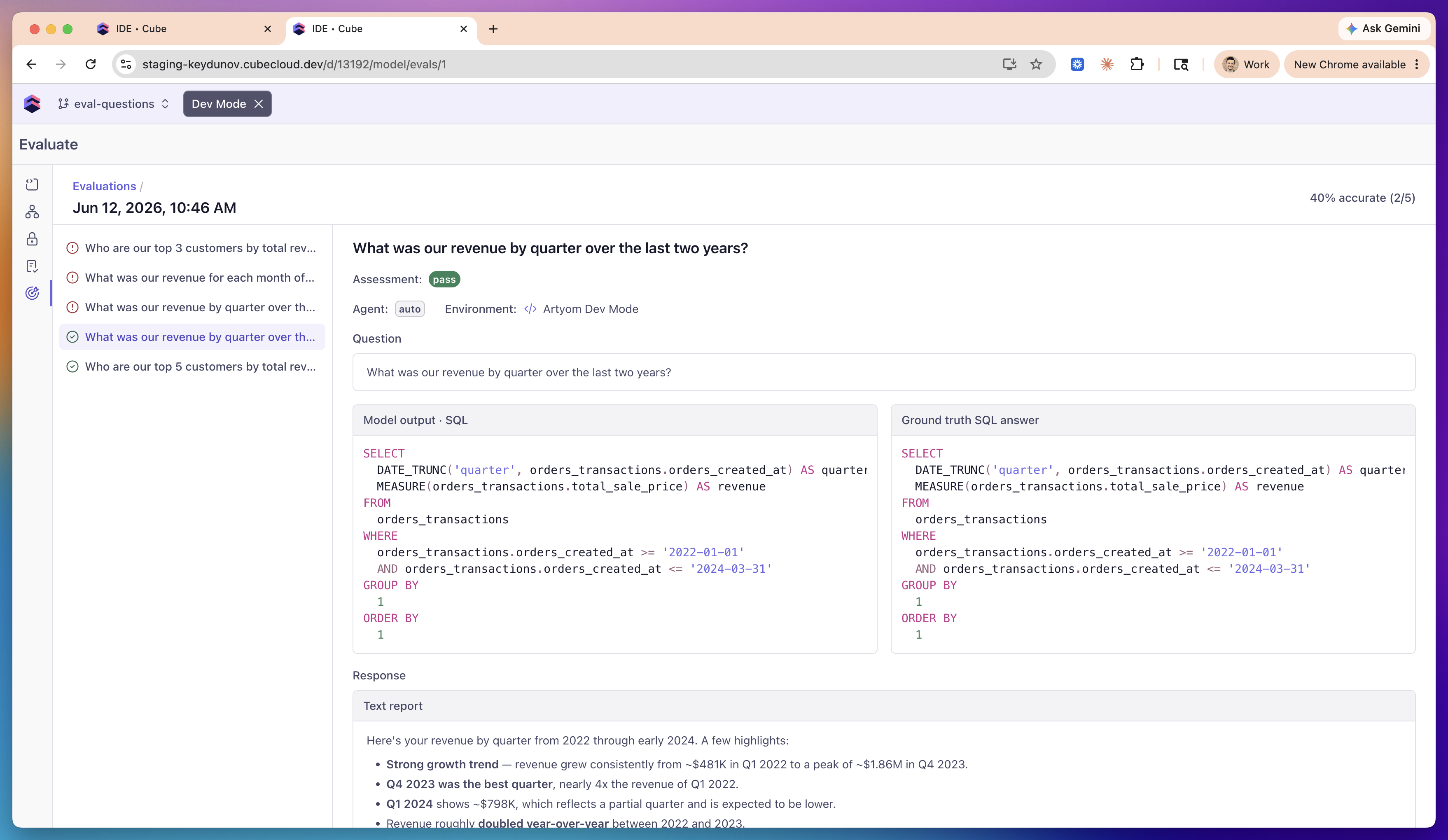
## Reading the results
Open a run to see per-question results: the question list on the left, with a
pass/fail icon for each, and the selected question's detail on the right.
* **Assessment** — `pass`, `fail`, `review`, or `error`.
* **Score reason** — when a question doesn't pass, a tag categorizing why:
**Row count mismatch**, **Missing columns**, **Value mismatch**,
**Unexpected rows**, **Query error**, **Ground truth query failed**,
**Ground truth not found**, or **Agent error**.
* **Failure analysis** — a plain-English explanation, e.g. *"The agent
returned 3 rows, but the ground truth has 5 rows."*
* **Model output · SQL** vs. **Ground truth SQL answer** — the agent's query
side-by-side with the ground truth, so you can spot the difference.
* **Response** — the agent's full text answer, rendered as Markdown.
## How grading works
Grading is execution-based, not text-based — the same approach used by
industry text-to-SQL benchmarks such as BIRD and Spider 2.0. The agent's SQL
and the ground-truth SQL are both executed, and their result sets are
compared. So an answer that's worded or written differently but produces the
same data still passes.
The comparison is:
* **Sort-invariant** — row order never matters.
* **Numeric-tolerant** — values are compared to 4 significant figures, so
float/representation noise (`6646` vs. `6646.0`) doesn't fail.
* **Column-name-agnostic and lenient on extra columns** — each ground-truth
column must be reproduced by some agent column, matched by its values, so
`revenue` vs. `total` aliases don't matter. Extra columns the agent adds are
ignored.
* **No standalone row-count gate** — row count falls out of the comparison: a
"top 5" question is enforced because the golden result has exactly 5 rows.
Verdicts:
| Verdict | When |
| ---------- | ----------------------------------------------------------------------------------------------------------------------- |
| **pass** | The agent's result set matches the ground truth. |
| **fail** | It ran but the result set doesn't match (see the score reason). |
| **review** | Nothing to compare automatically — the question has no ground truth, or the agent didn't run a query. Compare manually. |
| **error** | The agent run failed, the ground-truth query failed, or a referenced certified query wasn't found. |
## Limitations
* Questions are authored as code only; the **Questions** tab is read-only.
* Very large question sets can be slow to run.
* Grading is execution-based on the result set; it does not semantically judge
prose answers.
## Concepts
| Term | What it is |
| -------------- | ------------------------------------------------------------------------------------------------------------------------------------------------------- |
| **Question** | A natural-language question plus its **ground truth** (the correct answer, as SQL or a certified-query reference). Authored as code in your data model. |
| **Eval (run)** | One execution of the agent against the whole question set, on a specific branch and agent. |
| **Result** | The agent's answer to a single question in a run, graded against that question's ground truth. |
| **Accuracy** | `passed / total` for a run, shown as `NN% (passed/total)`. |
## Authoring benchmark questions
Questions live in your [data model repository](/admin/ai#agent-configuration),
versioned and branched like the rest of it. You can keep them in a single
top-level `agents/eval_questions.yml` file — the simplest place to start — or
split them across any number of `agents/eval_questions/*.yml` files as your set
grows. The parser picks up both and merges every file's `eval_questions` list
into one set, so you can move from one file to many at any time without changing
anything else.
Each file has a top-level `eval_questions` list. A question needs a unique
`name`, a `question`, and exactly one ground truth: a `certifiedQuery`
reference **or** inline `sql`.
```yaml theme={null}
# agents/eval_questions.yml
eval_questions:
- name: revenue_by_quarter
question: What was our revenue by quarter over the last two years?
certifiedQuery: revenue_by_quarter # reference an existing certified query by name
- name: arr_last_4_years
question: What was our ARR over the last 4 years?
sql: | # ...or inline SQL ground truth
SELECT date_trunc('year', created_at) AS year, SUM(arr) AS arr
FROM subscriptions GROUP BY 1 ORDER BY 1
```
* `certifiedQuery` references a [certified query](/admin/ai/certified-queries)
by name. Define it under `agents/certified_queries/` (or via **Certify this
query** in chat). A reference that doesn't resolve to an existing certified
query is flagged as a validation error.
* `sql` is inline ground-truth SQL, run through the same Cube SQL API the agent
uses (so `MEASURE(...)` and friends work).
* Omitting both — or setting both — is a validation error.
* An optional top-level `space` key scopes a file's questions to a named space
(defaults to `auto`). Question names are unique per space.
The **Questions** tab is a read-only view of these files. To add or edit
questions, edit the YAML in the IDE — there's no in-product question editor
yet.
## Running an eval
On the **Evals** tab, click **Run eval** and choose:
* **Branch** — which branch's data model and agent configuration to run
against. Defaults to the active branch.
* **Agent** — `auto` (the implicit auto-agent) or a configured agent name.
The run starts immediately and you can close the dialog — it executes in the
background. The run list shows live progress and then the outcome:
| Column | Meaning |
| -------------------- | ---------------------------------------------------------------------------------------------------------------------------------------------------------- |
| **Eval run** | When the run was created. |
| **Environment** | Where it ran — **dev** (your personal dev-mode branch, shown as "*Name* Dev Mode"), **staging**, or **prod** (the deploy branch, e.g. `master` or `main`). |
| **Agent** | The agent used. |
| **Execution status** | Running, Completed, or Failed. |
| **Accuracy** | `NN% (passed/total)`. |
| **Created by** | Who triggered the run. |
| **Last updated** | When it finished. |
## Reading the results
Open a run to see per-question results: the question list on the left, with a
pass/fail icon for each, and the selected question's detail on the right.
* **Assessment** — `pass`, `fail`, `review`, or `error`.
* **Score reason** — when a question doesn't pass, a tag categorizing why:
**Row count mismatch**, **Missing columns**, **Value mismatch**,
**Unexpected rows**, **Query error**, **Ground truth query failed**,
**Ground truth not found**, or **Agent error**.
* **Failure analysis** — a plain-English explanation, e.g. *"The agent
returned 3 rows, but the ground truth has 5 rows."*
* **Model output · SQL** vs. **Ground truth SQL answer** — the agent's query
side-by-side with the ground truth, so you can spot the difference.
* **Response** — the agent's full text answer, rendered as Markdown.
## How grading works
Grading is execution-based, not text-based — the same approach used by
industry text-to-SQL benchmarks such as BIRD and Spider 2.0. The agent's SQL
and the ground-truth SQL are both executed, and their result sets are
compared. So an answer that's worded or written differently but produces the
same data still passes.
The comparison is:
* **Sort-invariant** — row order never matters.
* **Numeric-tolerant** — values are compared to 4 significant figures, so
float/representation noise (`6646` vs. `6646.0`) doesn't fail.
* **Column-name-agnostic and lenient on extra columns** — each ground-truth
column must be reproduced by some agent column, matched by its values, so
`revenue` vs. `total` aliases don't matter. Extra columns the agent adds are
ignored.
* **No standalone row-count gate** — row count falls out of the comparison: a
"top 5" question is enforced because the golden result has exactly 5 rows.
Verdicts:
| Verdict | When |
| ---------- | ----------------------------------------------------------------------------------------------------------------------- |
| **pass** | The agent's result set matches the ground truth. |
| **fail** | It ran but the result set doesn't match (see the score reason). |
| **review** | Nothing to compare automatically — the question has no ground truth, or the agent didn't run a query. Compare manually. |
| **error** | The agent run failed, the ground-truth query failed, or a referenced certified query wasn't found. |
## Limitations
* Questions are authored as code only; the **Questions** tab is read-only.
* Very large question sets can be slow to run.
* Grading is execution-based on the result set; it does not semantically judge
prose answers.