> ## Documentation Index
> Fetch the complete documentation index at: https://cubed3-feat-druid-driver-streaming.mintlify.site/llms.txt
> Use this file to discover all available pages before exploring further.
# Performance Insights
> Use Performance Insights charts in Cube Cloud to interpret API load, queues, and resource behavior when tuning a deployment.
The **Performance** page in Cube Cloud displays charts that help
analyze the performance of your deployment and fine-tune its configuration.
It's recommended to review Performance Insights when the workload changes
or if you face any performance-related issues with your deployment.
Available on [Premium and above plans](https://cube.dev/pricing).
You can also choose a [Query History tier](/admin/account-billing/pricing#query-history-tiers).
## Charts
Charts provide insights into different aspects of your deployment.
### API instances
The **API instances** chart shows the number of API instances
that served queries to the deployment.
You can use this chart to **fine-tune the
[auto-scaling][ref-scalability-api] configuration of API instances**, e.g.,
increase the minimum and maximum number of API instances.
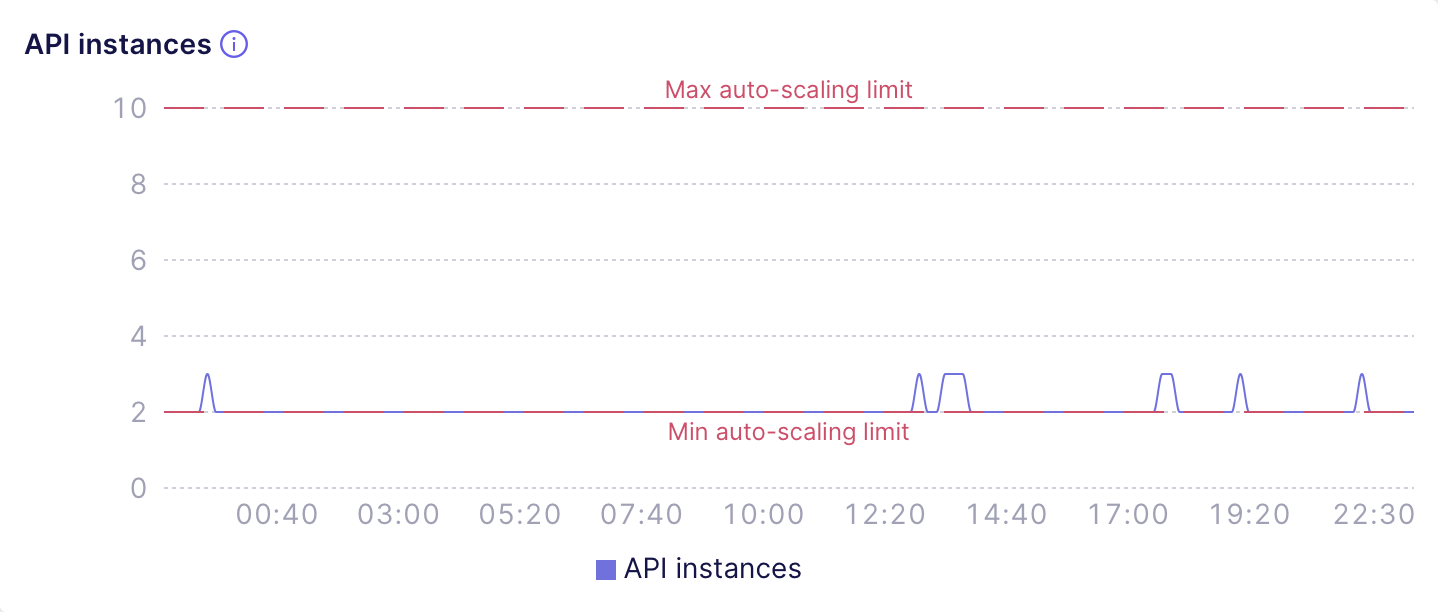
For example, the following chart shows a deployment with sane auto-scaling
limits that don't need adjusting. It looks like the deployment needs to
sustain just a few infrequent load bursts per day and auto-scaling to 3 API
instances does the job just fine:
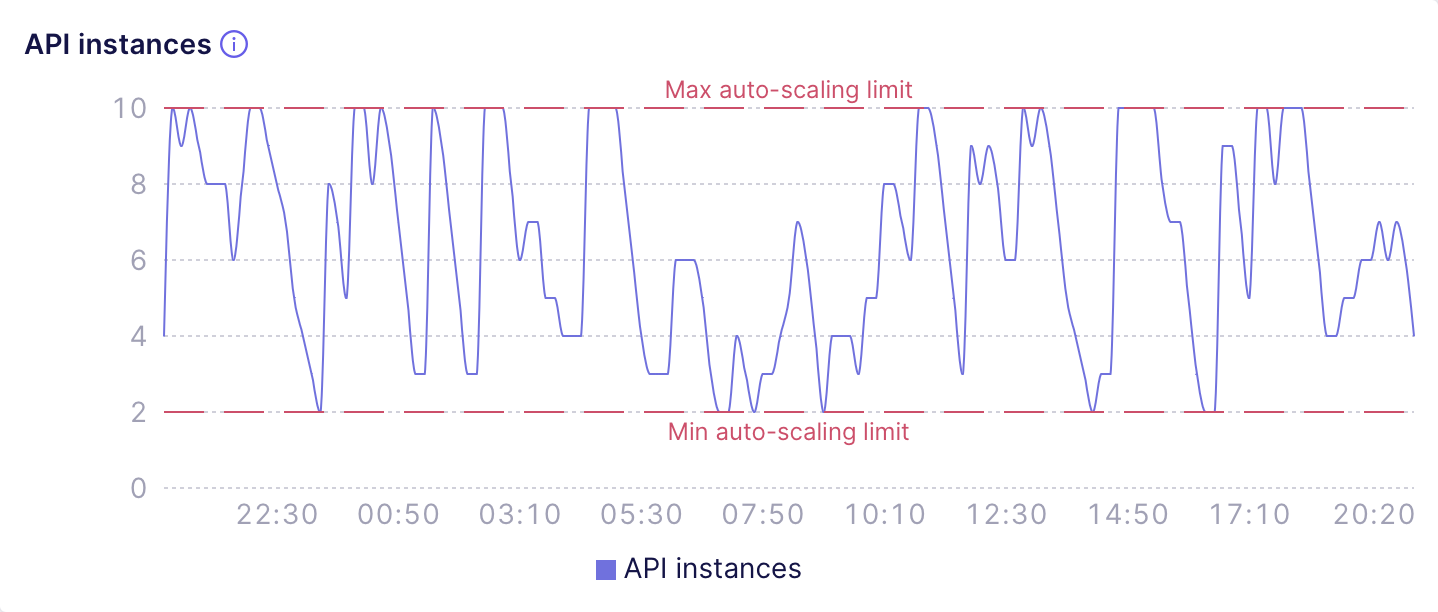
 The next chart shows a deployment with auto-scaling limits that definitely
need an adjustment. It looks like the load is so high that most of the time
this deployment has to use at least 4-6 API instances. So, it would be wise
to increase the minimum auto-scaling limit to 6 API instances:
The next chart shows a deployment with auto-scaling limits that definitely
need an adjustment. It looks like the load is so high that most of the time
this deployment has to use at least 4-6 API instances. So, it would be wise
to increase the minimum auto-scaling limit to 6 API instances:
 When in doubt, consider using a higher minimum auto-scaling limit: when an
additional API instance starts, it needs some time to compile the data model
before it would be able to serve the requests. So, over-provisioning API
instances with a higher minimum auto-scaling limit would allow to decrease
the number of requests that had to wait for the [data model
compilation](#data-model-compilation).
Also, you can use this chart to **fine-tune the
[auto-suspension][ref-auto-sus] configuration**, e.g., by turning
auto-suspension off or increasing the auto-suspension threshold.
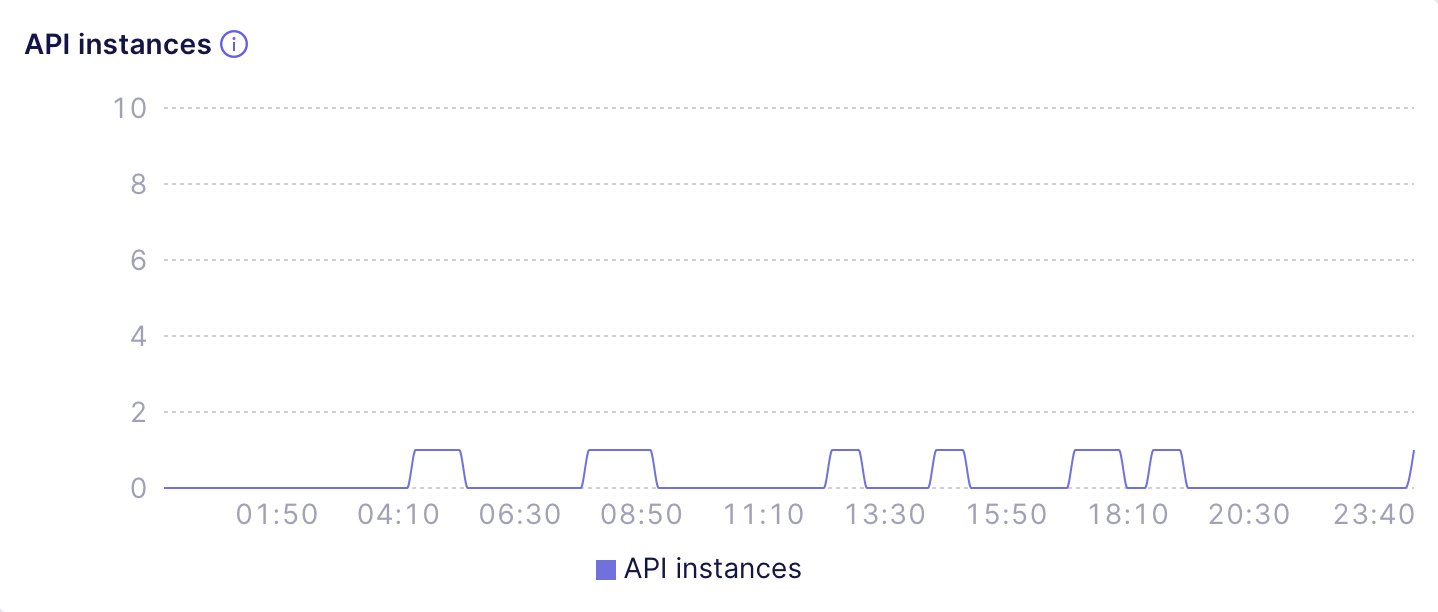
For example, the following chart shows a [Shared
deployment][ref-dev-instance] that is only accessed a few times
a day and automatically suspends after a short period of inactivity:
When in doubt, consider using a higher minimum auto-scaling limit: when an
additional API instance starts, it needs some time to compile the data model
before it would be able to serve the requests. So, over-provisioning API
instances with a higher minimum auto-scaling limit would allow to decrease
the number of requests that had to wait for the [data model
compilation](#data-model-compilation).
Also, you can use this chart to **fine-tune the
[auto-suspension][ref-auto-sus] configuration**, e.g., by turning
auto-suspension off or increasing the auto-suspension threshold.
For example, the following chart shows a [Shared
deployment][ref-dev-instance] that is only accessed a few times
a day and automatically suspends after a short period of inactivity:
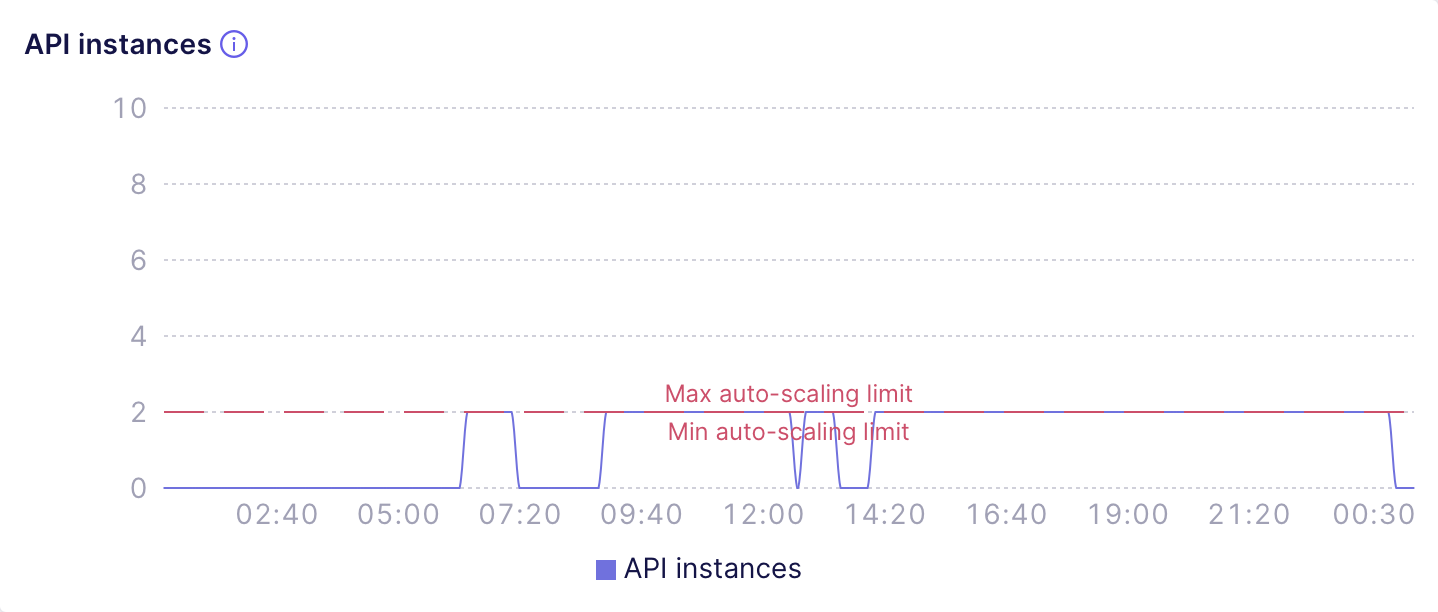
 The next chart shows a misconfigured [Dedicated
deployment][ref-prod-cluster] that serves the requests throughout the whole
day but was configured to auto-suspend with a tiny threshold:
The next chart shows a misconfigured [Dedicated
deployment][ref-prod-cluster] that serves the requests throughout the whole
day but was configured to auto-suspend with a tiny threshold:
 ### Cache type
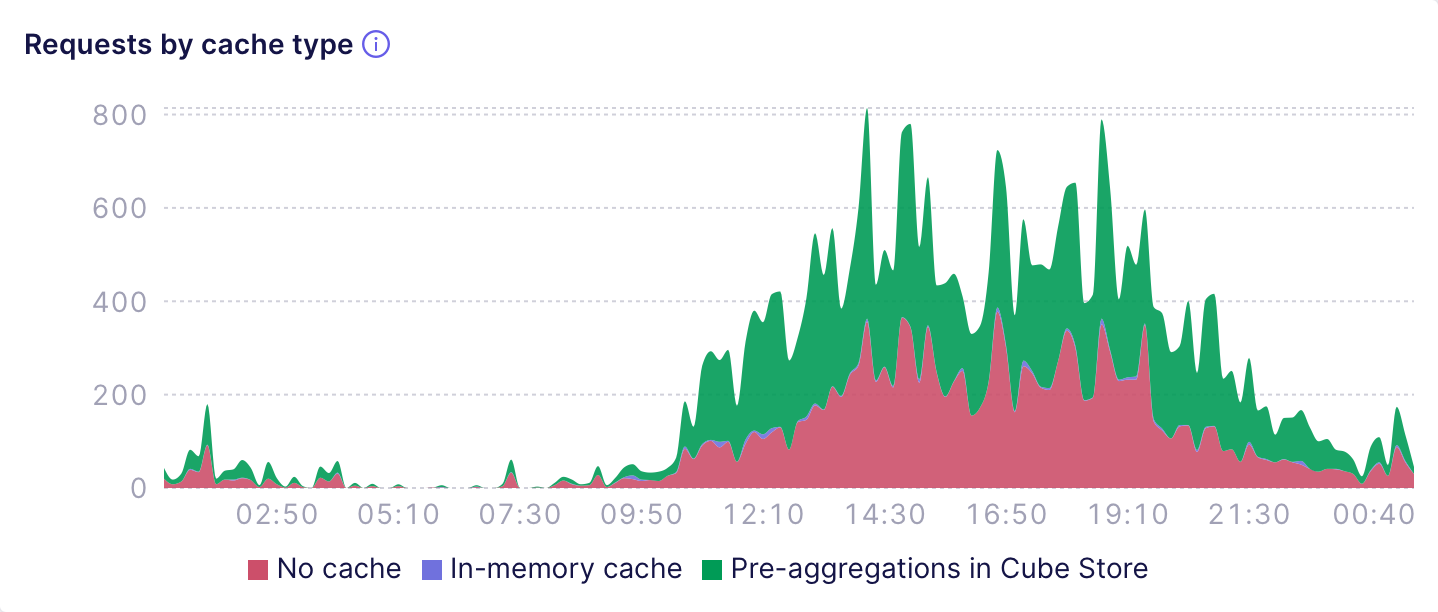
The **Requests by cache type** chart shows the number of API
requests that were fulfilled by specific [cache types][ref-cache-types],
e.g., pre-aggregations, in-memory cache, no cache, etc. For example, the
following chart shows a deployment that fulfills about 50% of requests by
using pre-aggregations:
### Cache type
The **Requests by cache type** chart shows the number of API
requests that were fulfilled by specific [cache types][ref-cache-types],
e.g., pre-aggregations, in-memory cache, no cache, etc. For example, the
following chart shows a deployment that fulfills about 50% of requests by
using pre-aggregations:
 The **Avg. response time by cache type** shows the difference
in the response time for requests that hit pre-aggregations, in-memory cache,
or no cache (i.e., the upstream data source). The next chart shows that
pre-aggregations usually provide sub-second response times while queries to
the data source take much longer:
The **Avg. response time by cache type** shows the difference
in the response time for requests that hit pre-aggregations, in-memory cache,
or no cache (i.e., the upstream data source). The next chart shows that
pre-aggregations usually provide sub-second response times while queries to
the data source take much longer:
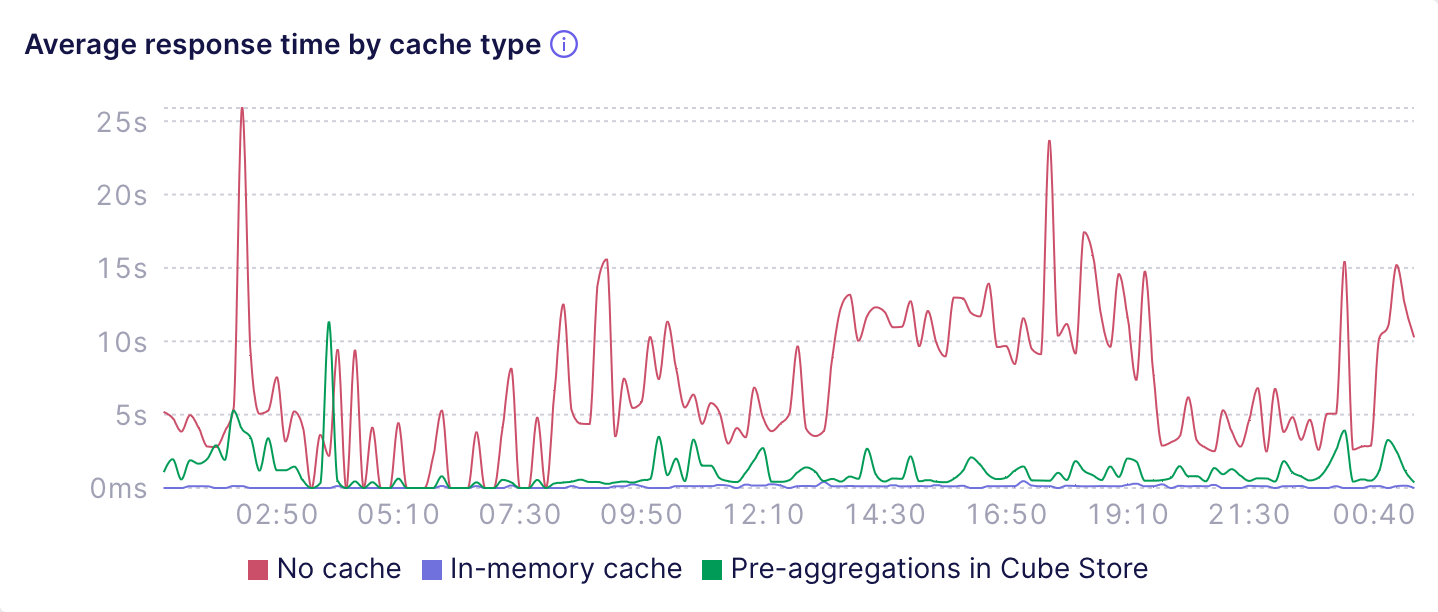 You can use these charts to see if you'd like to have more queries that hit
the cache and have lower response time. In that case, **consider adding more
[pre-aggregations][ref-pre-aggregations] in Cube Store** or fine-tune the
existing ones, e.g., by **[using indexes][ref-indexes] to speed up
pre-aggregations with suboptimal query plans**.
### Data model compilation
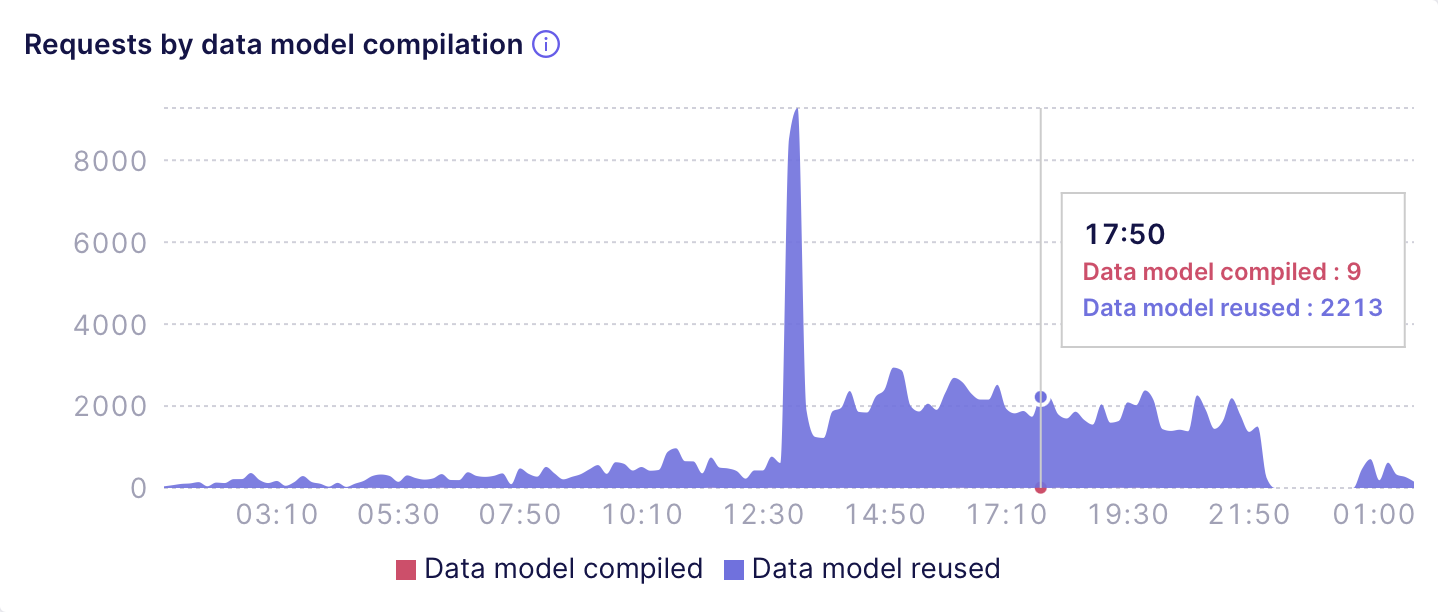
The **Requests by data model compilation** chart shows the
number of API requests that had or had not to wait for the data model
compilation. For example, the following chart shows a deployment that
only has a tiny fraction of requests that require the data model to be
compiled:
You can use these charts to see if you'd like to have more queries that hit
the cache and have lower response time. In that case, **consider adding more
[pre-aggregations][ref-pre-aggregations] in Cube Store** or fine-tune the
existing ones, e.g., by **[using indexes][ref-indexes] to speed up
pre-aggregations with suboptimal query plans**.
### Data model compilation
The **Requests by data model compilation** chart shows the
number of API requests that had or had not to wait for the data model
compilation. For example, the following chart shows a deployment that
only has a tiny fraction of requests that require the data model to be
compiled:
 The **Wait time for data model compilation** chart
shows the total time requests had to wait for the data model compilation.
The next chart shows that at certain points of time requests had to wait
dozens of seconds while the data model was being compiled:
The **Wait time for data model compilation** chart
shows the total time requests had to wait for the data model compilation.
The next chart shows that at certain points of time requests had to wait
dozens of seconds while the data model was being compiled:
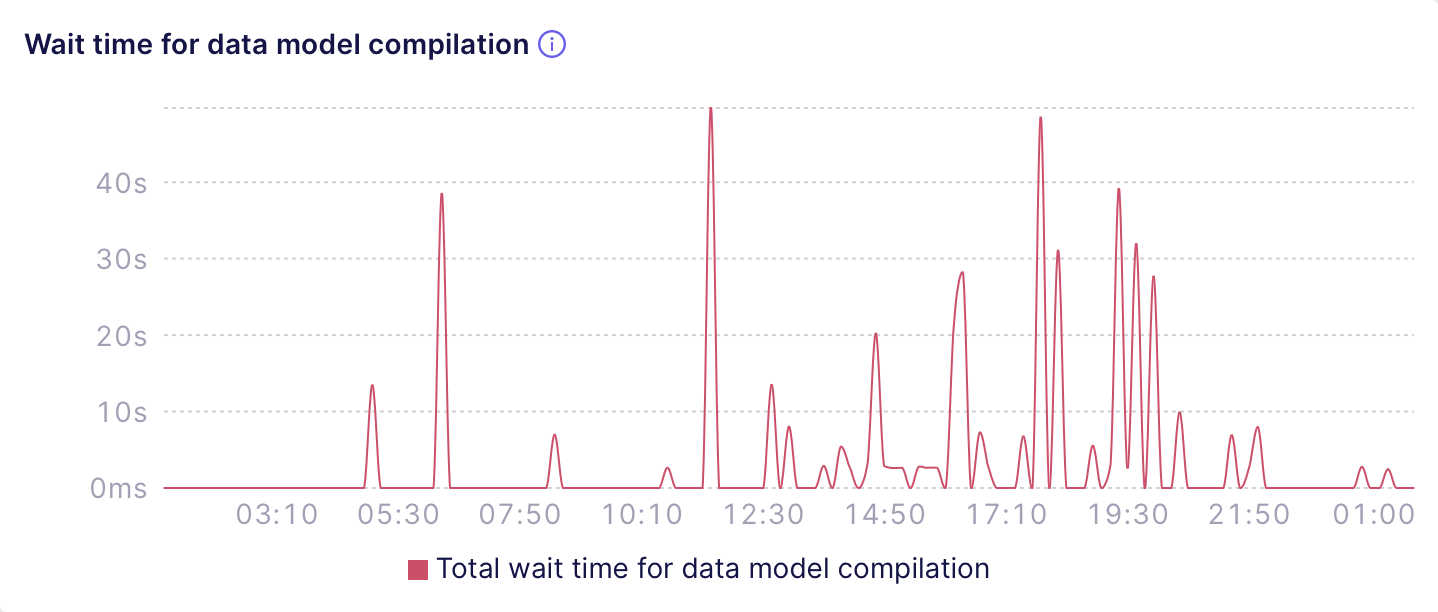 You can use these charts to **fine-tune the [auto-suspension][ref-auto-sus]
configuration** (e.g., turn it off or increase the threshold so that API
instances suspend less frequently), **identify [multitenancy][ref-multitenancy]
misconfiguration** (e.g., suboptimal bucketing via
[`context_to_app_id`][ref-context-to-app-id]), or
**consider using a [Multi-cluster deployment][ref-multi-cluster]** to
distribute requests to different tenants over a number of Dedicated
deployments.
### Cube Store
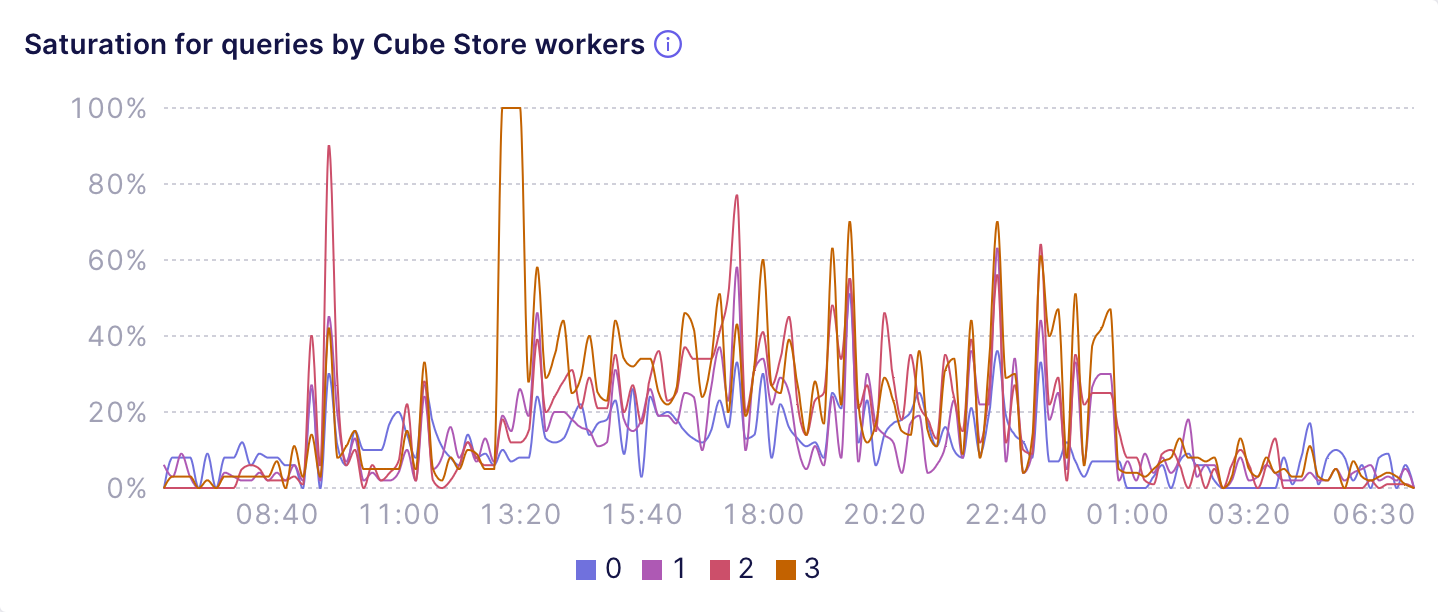
The **Saturation for queries by Cube Store workers** chart
shows if Cube Store workers are overloaded with serving **queries**.
High saturation for queries prevents Cube Store workers from fulfilling
requests and results in wait time displayed at the **Wait time for
queries by Cube Store workers** chart.
For example, the following chart shows a deployment that uses 4 Cube Store
workers and almost never lets them come to saturation, resulting in no wait
time for queries:
You can use these charts to **fine-tune the [auto-suspension][ref-auto-sus]
configuration** (e.g., turn it off or increase the threshold so that API
instances suspend less frequently), **identify [multitenancy][ref-multitenancy]
misconfiguration** (e.g., suboptimal bucketing via
[`context_to_app_id`][ref-context-to-app-id]), or
**consider using a [Multi-cluster deployment][ref-multi-cluster]** to
distribute requests to different tenants over a number of Dedicated
deployments.
### Cube Store
The **Saturation for queries by Cube Store workers** chart
shows if Cube Store workers are overloaded with serving **queries**.
High saturation for queries prevents Cube Store workers from fulfilling
requests and results in wait time displayed at the **Wait time for
queries by Cube Store workers** chart.
For example, the following chart shows a deployment that uses 4 Cube Store
workers and almost never lets them come to saturation, resulting in no wait
time for queries:
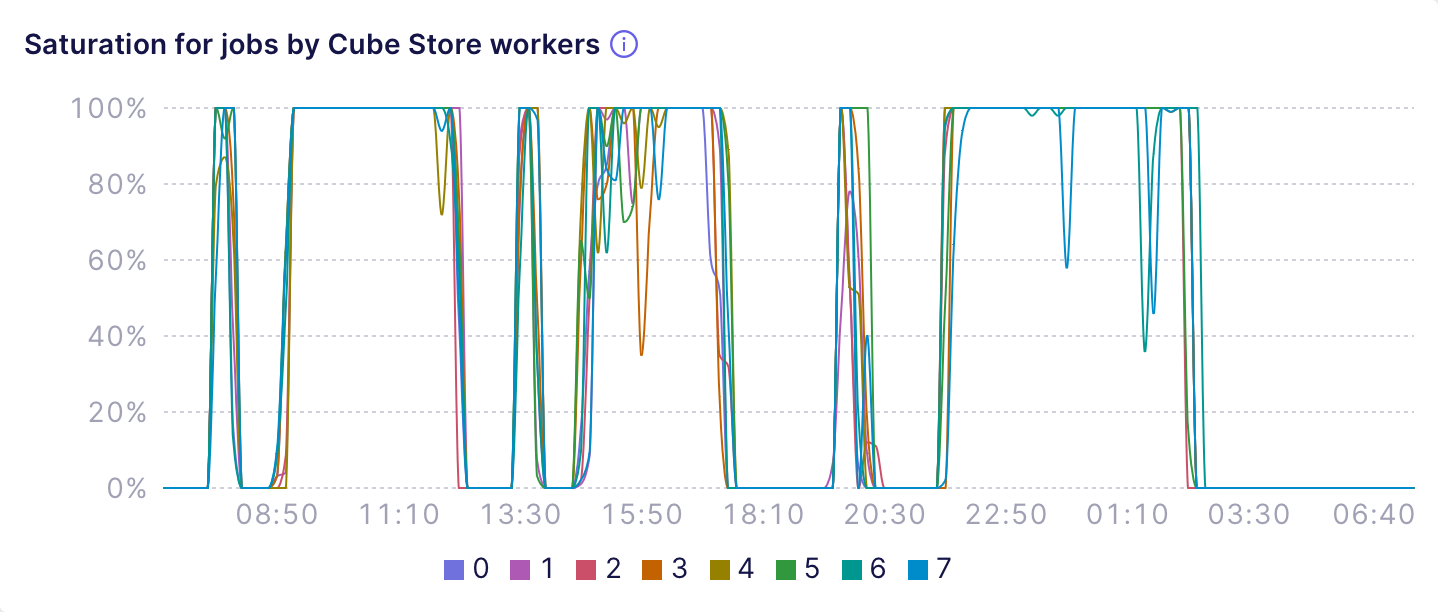
 Similarly, the **Saturation for jobs by Cube Store workers**
and **Wait time for jobs by Cube Store workers** charts show if
Cube Store Workers are overloaded with serving **jobs**, i.e., building
pre-aggregations or performing internal tasks such as data compaction.
For example, the following chart shows a misconfigured deployment that uses
8 Cube Store workers and keeps them at full saturation during prolonged
intervals, resulting in huge wait time and, in case of jobs, delayed refresh
of pre-aggregations:
Similarly, the **Saturation for jobs by Cube Store workers**
and **Wait time for jobs by Cube Store workers** charts show if
Cube Store Workers are overloaded with serving **jobs**, i.e., building
pre-aggregations or performing internal tasks such as data compaction.
For example, the following chart shows a misconfigured deployment that uses
8 Cube Store workers and keeps them at full saturation during prolonged
intervals, resulting in huge wait time and, in case of jobs, delayed refresh
of pre-aggregations:
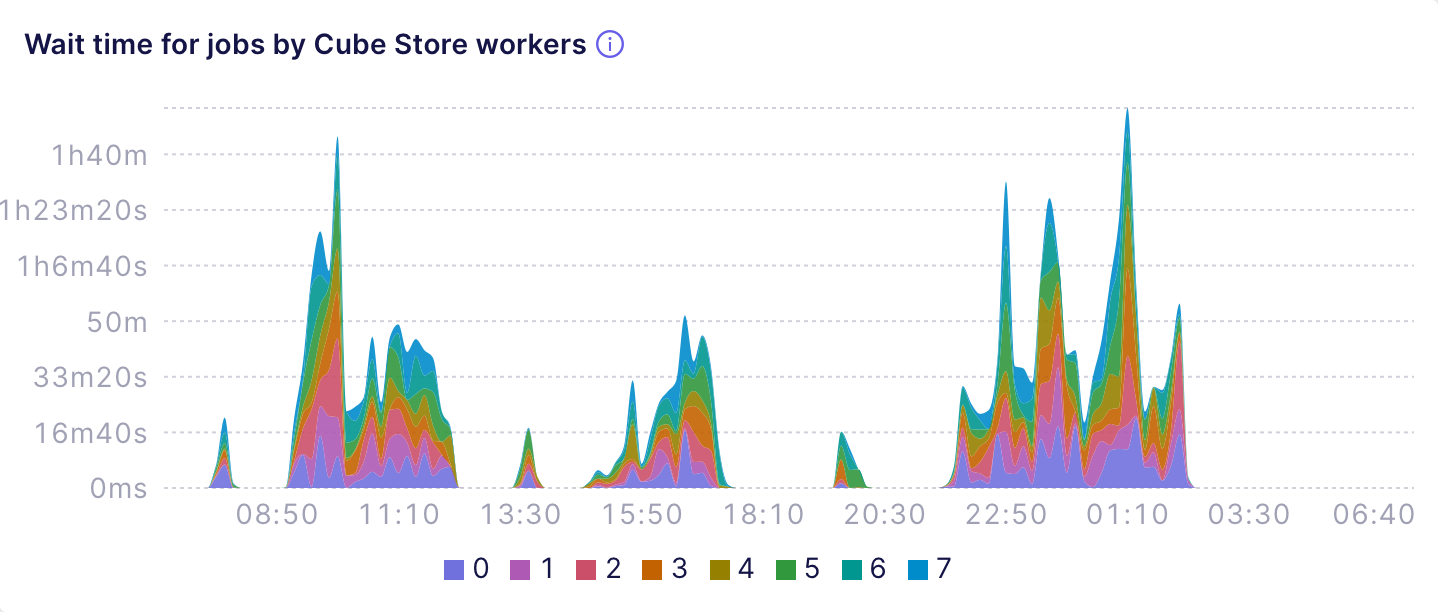
 The next chart shows that oversaturated Cube Store workers might yield
hours of wait time for queries and jobs:
The next chart shows that oversaturated Cube Store workers might yield
hours of wait time for queries and jobs:
 You can use these charts to **fine-tune the [number of Cube Store
workers][ref-scalability-cube-store]** used by your deployment, e.g.,
increase it until you see that there's no saturation and no wait time
for queries and jobs.
[ref-scalability-api]: /admin/deployment/scalability#auto-scaling-of-api-instances
[ref-scalability-cube-store]: /admin/deployment/scalability#sizing-cube-store-workers
[ref-auto-sus]: /admin/deployment/auto-suspension
[ref-dev-instance]: /admin/deployment/deployment-types#shared
[ref-prod-cluster]: /admin/deployment/deployment-types#dedicated
[ref-multi-cluster]: /admin/deployment/deployment-types#multi-cluster
[ref-pre-aggregations]: /docs/pre-aggregations/using-pre-aggregations
[ref-multitenancy]: /embedding/multitenancy
[ref-context-to-app-id]: /reference/configuration/config#context_to_app_id
[ref-cache-types]: /docs/pre-aggregations#cache-type
[ref-indexes]: /docs/pre-aggregations/using-pre-aggregations#using-indexes
You can use these charts to **fine-tune the [number of Cube Store
workers][ref-scalability-cube-store]** used by your deployment, e.g.,
increase it until you see that there's no saturation and no wait time
for queries and jobs.
[ref-scalability-api]: /admin/deployment/scalability#auto-scaling-of-api-instances
[ref-scalability-cube-store]: /admin/deployment/scalability#sizing-cube-store-workers
[ref-auto-sus]: /admin/deployment/auto-suspension
[ref-dev-instance]: /admin/deployment/deployment-types#shared
[ref-prod-cluster]: /admin/deployment/deployment-types#dedicated
[ref-multi-cluster]: /admin/deployment/deployment-types#multi-cluster
[ref-pre-aggregations]: /docs/pre-aggregations/using-pre-aggregations
[ref-multitenancy]: /embedding/multitenancy
[ref-context-to-app-id]: /reference/configuration/config#context_to_app_id
[ref-cache-types]: /docs/pre-aggregations#cache-type
[ref-indexes]: /docs/pre-aggregations/using-pre-aggregations#using-indexes