> ## Documentation Index
> Fetch the complete documentation index at: https://cubed3-feat-druid-driver-streaming.mintlify.site/llms.txt
> Use this file to discover all available pages before exploring further.
# Configuration
> Configure model-level query defaults for a Cube deployment — query time zone, row limits, and query timeout.
The **Model Configuration** section in deployment settings is where you set
model-level defaults that every query in a [deployment][ref-deployment-types]
inherits unless it overrides them explicitly: the query time zone, default
and maximum row limits, and the per-query timeout.
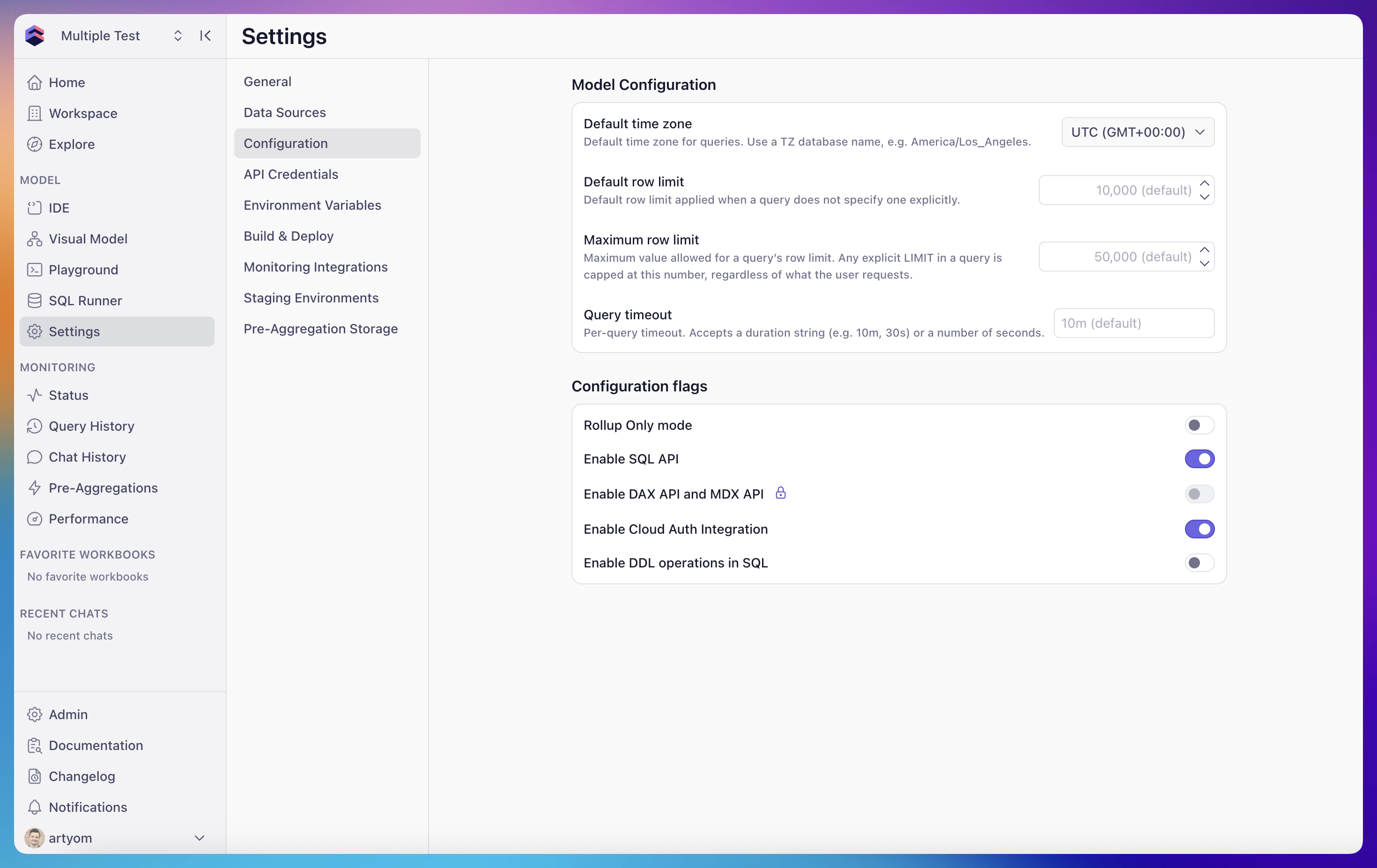 To open it, go to **Settings** → **Configuration** in the deployment
sidebar.
Model Configuration is a curated, typed UI for the most common
model-level environment variables. Anything set here can also be set
through the [Environment Variables][ref-env-vars] page directly.
## Default time zone
The time zone used to interpret and return time dimensions when a query
doesn't specify one. Accepts any TZ database name, such as
`America/Los_Angeles` or `Europe/Berlin`. Defaults to `UTC`.
Backed by the
[`CUBEJS_DEFAULT_TIMEZONE`](/reference/configuration/environment-variables#cubejs_default_timezone)
environment variable. See [time zone][ref-time-zone] in the queries
reference for how Cube applies it to time dimensions and date ranges.
## Default row limit
The [row limit][ref-row-limit] applied to a query when it doesn't include
an explicit `LIMIT`. Defaults to `10,000`.
Lower this if most of your dashboards aggregate to a small number of rows
and you want to catch run-away "select everything" queries earlier. Raise
it if you're frequently truncating legitimate result sets.
Backed by
[`CUBEJS_DB_QUERY_DEFAULT_LIMIT`](/reference/configuration/environment-variables#cubejs_db_query_default_limit).
## Maximum row limit
The hard cap on row count for any query. Any explicit `LIMIT` is reduced
to this value, regardless of what the client requested. Defaults to
`50,000`.
This is the guardrail that protects the deployment from out-of-memory
crashes and accidental full-table extracts.
Raising the maximum row limit can cause out-of-memory crashes and makes
the deployment more vulnerable to denial-of-service attacks if the APIs
are exposed to untrusted clients. Increase it only when you have a
specific use case that requires it.
Backed by
[`CUBEJS_DB_QUERY_LIMIT`](/reference/configuration/environment-variables#cubejs_db_query_limit).
[SQL API][ref-sql-api] queries running in streaming mode can exceed this
cap by design.
## Query timeout
The per-query timeout applied to the upstream data source. Accepts a
duration string (`10m`, `30s`, `2h`) or a plain number of seconds.
Defaults to `10m`.
If a query exceeds this timeout, Cube cancels it and returns an error to
the client. Tune this based on the slowest legitimate query you expect to
run against the data source.
Backed by
[`CUBEJS_DB_QUERY_TIMEOUT`](/reference/configuration/environment-variables#cubejs_db_query_timeout).
## Applying changes
Saving Model Configuration restarts the deployment's development-mode
worker so the new values take effect immediately for the
[development environment][ref-environments-dev]. Production environments
pick up the changes on the next build or deploy.
[ref-deployment-types]: /admin/deployment/deployment-types
[ref-env-vars]: /reference/configuration/environment-variables
[ref-time-zone]: /reference/core-data-apis/queries#time-zone
[ref-row-limit]: /reference/core-data-apis/queries#row-limit
[ref-sql-api]: /reference/core-data-apis/sql-api
[ref-environments-dev]: /admin/deployment/environments#development-environments
To open it, go to **Settings** → **Configuration** in the deployment
sidebar.
Model Configuration is a curated, typed UI for the most common
model-level environment variables. Anything set here can also be set
through the [Environment Variables][ref-env-vars] page directly.
## Default time zone
The time zone used to interpret and return time dimensions when a query
doesn't specify one. Accepts any TZ database name, such as
`America/Los_Angeles` or `Europe/Berlin`. Defaults to `UTC`.
Backed by the
[`CUBEJS_DEFAULT_TIMEZONE`](/reference/configuration/environment-variables#cubejs_default_timezone)
environment variable. See [time zone][ref-time-zone] in the queries
reference for how Cube applies it to time dimensions and date ranges.
## Default row limit
The [row limit][ref-row-limit] applied to a query when it doesn't include
an explicit `LIMIT`. Defaults to `10,000`.
Lower this if most of your dashboards aggregate to a small number of rows
and you want to catch run-away "select everything" queries earlier. Raise
it if you're frequently truncating legitimate result sets.
Backed by
[`CUBEJS_DB_QUERY_DEFAULT_LIMIT`](/reference/configuration/environment-variables#cubejs_db_query_default_limit).
## Maximum row limit
The hard cap on row count for any query. Any explicit `LIMIT` is reduced
to this value, regardless of what the client requested. Defaults to
`50,000`.
This is the guardrail that protects the deployment from out-of-memory
crashes and accidental full-table extracts.
Raising the maximum row limit can cause out-of-memory crashes and makes
the deployment more vulnerable to denial-of-service attacks if the APIs
are exposed to untrusted clients. Increase it only when you have a
specific use case that requires it.
Backed by
[`CUBEJS_DB_QUERY_LIMIT`](/reference/configuration/environment-variables#cubejs_db_query_limit).
[SQL API][ref-sql-api] queries running in streaming mode can exceed this
cap by design.
## Query timeout
The per-query timeout applied to the upstream data source. Accepts a
duration string (`10m`, `30s`, `2h`) or a plain number of seconds.
Defaults to `10m`.
If a query exceeds this timeout, Cube cancels it and returns an error to
the client. Tune this based on the slowest legitimate query you expect to
run against the data source.
Backed by
[`CUBEJS_DB_QUERY_TIMEOUT`](/reference/configuration/environment-variables#cubejs_db_query_timeout).
## Applying changes
Saving Model Configuration restarts the deployment's development-mode
worker so the new values take effect immediately for the
[development environment][ref-environments-dev]. Production environments
pick up the changes on the next build or deploy.
[ref-deployment-types]: /admin/deployment/deployment-types
[ref-env-vars]: /reference/configuration/environment-variables
[ref-time-zone]: /reference/core-data-apis/queries#time-zone
[ref-row-limit]: /reference/core-data-apis/queries#row-limit
[ref-sql-api]: /reference/core-data-apis/sql-api
[ref-environments-dev]: /admin/deployment/environments#development-environments