> ## Documentation Index
> Fetch the complete documentation index at: https://cubed3-feat-druid-driver-streaming.mintlify.site/llms.txt
> Use this file to discover all available pages before exploring further.
# Content Validator
> Find saved reports that reference data model fields or views that no longer exist, and fix or remove them before a model change breaks live dashboards.
Content Validator is currently in preview, and the user experience may still
change. Reach out to the [Cube support team](/admin/account-billing/support)
to activate this feature for your account.
The Content Validator finds saved reports whose queries reference data model
members — individual fields or whole views — that no longer exist in your
current data model. Use it to catch and fix broken content while you are
changing the model, before the change ships and breaks live
[dashboards][ref-dashboards].
## Opening the Content Validator
In Cube Cloud, navigate to the **Data Model** module and select the
**Content Validator** tab.
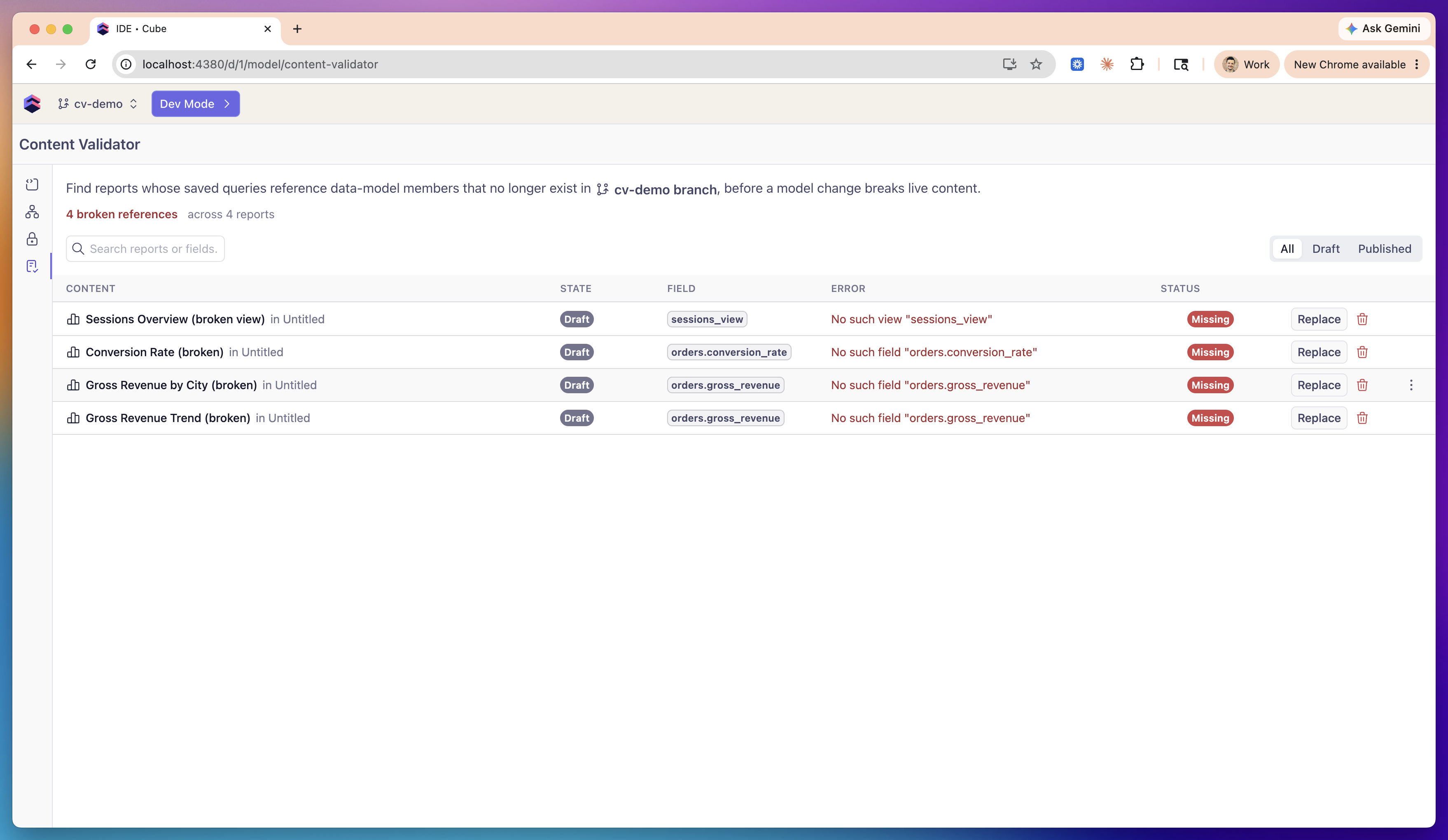 Validation runs in real time, right when you open the tab — there is no
background job to schedule or wait for.
## How validation works
The Content Validator checks every [workbook][ref-workbooks] in the
deployment. For each workbook, it validates the workbook's draft reports as
well as the report snapshots of its published [dashboard][ref-dashboards].
Each report's query is checked with the same query parser the report editor
uses, so a reference flagged here is exactly the broken reference a viewer
would hit when opening that report.
Validation is branch-aware: reports are checked against the data model of
whatever context you are currently in — your
[development mode][ref-dev-mode], a shared branch, or production. The page
header names the context you are validating against, so you always know which
version of the model the findings apply to.
The Content Validator uses the full data model, ignoring visibility settings
and access policies. A report referencing a member that is hidden with
[`public: false`][ref-cube-public] or restricted by an
[access policy][ref-access-policies] is **not** flagged — the member still
exists in the model. Only references to members that are truly gone are
reported.
## Reviewing findings
Each broken reference is one row in the findings table:
| Column | What it shows |
| ----------- | ----------------------------------------------------------------------------------------- |
| **Content** | The report name and the workbook it belongs to. |
| **State** | Whether the finding is in a **Draft** report or a **Published** dashboard snapshot. |
| **Field** | The broken member reference, e.g., `orders.total`. |
| **Error** | The parser error, e.g., `No such field "orders.total"` or `No such view "sessions_view"`. |
| **Status** | The state of the reference — **Missing**. |
There are two kinds of findings:
* **Missing field** — the report references a member (a measure or a
dimension) that no longer exists in an otherwise valid view.
* **Missing view** — the report queries a view that no longer exists in the
data model.
Use the search box above the table to filter findings by report, workbook, or
member name, and the **All** / **Draft** / **Published** filter to focus on
one kind of content.
If every reference resolves, the page shows *No broken references found*.
## Fixing broken references
How you fix a finding depends on whether it is in a draft report or a
published dashboard snapshot:
* **Draft reports** are editable in place. Each draft finding offers
**Open**, **Replace**, and **Delete** actions.
* **Published dashboards** are immutable snapshots — they only change when
their dashboard is republished. Published findings offer only an **Open**
action; to fix one, update the draft report in its workbook and republish
the dashboard.
### Open
**Open** navigates to the content itself: the report in its workbook for a
draft finding, or the live published dashboard for a published finding.
### Replace
**Replace** swaps the broken reference for an existing one across the
report's saved query. Clicking it opens a dialog with a searchable picker of
valid replacements — members of the same view for a missing field, or other
views for a missing view.
* If several draft reports share the same broken reference, the dialog offers
a **Replace in all affected reports** checkbox (enabled by default) so you
can fix them all in one action.
* If a published dashboard references the same member, the dialog notes that
it will keep its current snapshot until the dashboard is republished.
When you apply a replacement, Cube rewrites each affected report's saved
query, persists it, and re-runs validation, so fixed rows clear from the
table immediately. The rewrite is precise: only references to the broken
member are updated, while same-named members of other views are left
untouched.
### Delete
**Delete** permanently removes the report from its workbook — use it for
reports that are no longer worth fixing. A confirmation dialog is shown
before anything is deleted, and validation re-runs afterwards.
## Scope and limitations
* The Content Validator validates reports whose queries are stored as
semantic SQL. A report whose query the parser cannot read is counted as
*not checked* — it is neither flagged as broken nor asserted to be clean.
When this happens, the summary shows a *N reports could not be checked*
note.
* Validation covers each workbook's draft reports and its published dashboard
snapshots.
* **Replace** and **Delete** act on draft reports only. Fixing published
content is a two-step process: fix the draft, then republish the dashboard.
[ref-workbooks]: /docs/explore-analyze/workbooks
[ref-dashboards]: /docs/explore-analyze/dashboards
[ref-dev-mode]: /docs/data-modeling/dev-mode
[ref-cube-public]: /reference/data-modeling/cube#public
[ref-access-policies]: /docs/data-modeling/data-access-policies
Validation runs in real time, right when you open the tab — there is no
background job to schedule or wait for.
## How validation works
The Content Validator checks every [workbook][ref-workbooks] in the
deployment. For each workbook, it validates the workbook's draft reports as
well as the report snapshots of its published [dashboard][ref-dashboards].
Each report's query is checked with the same query parser the report editor
uses, so a reference flagged here is exactly the broken reference a viewer
would hit when opening that report.
Validation is branch-aware: reports are checked against the data model of
whatever context you are currently in — your
[development mode][ref-dev-mode], a shared branch, or production. The page
header names the context you are validating against, so you always know which
version of the model the findings apply to.
The Content Validator uses the full data model, ignoring visibility settings
and access policies. A report referencing a member that is hidden with
[`public: false`][ref-cube-public] or restricted by an
[access policy][ref-access-policies] is **not** flagged — the member still
exists in the model. Only references to members that are truly gone are
reported.
## Reviewing findings
Each broken reference is one row in the findings table:
| Column | What it shows |
| ----------- | ----------------------------------------------------------------------------------------- |
| **Content** | The report name and the workbook it belongs to. |
| **State** | Whether the finding is in a **Draft** report or a **Published** dashboard snapshot. |
| **Field** | The broken member reference, e.g., `orders.total`. |
| **Error** | The parser error, e.g., `No such field "orders.total"` or `No such view "sessions_view"`. |
| **Status** | The state of the reference — **Missing**. |
There are two kinds of findings:
* **Missing field** — the report references a member (a measure or a
dimension) that no longer exists in an otherwise valid view.
* **Missing view** — the report queries a view that no longer exists in the
data model.
Use the search box above the table to filter findings by report, workbook, or
member name, and the **All** / **Draft** / **Published** filter to focus on
one kind of content.
If every reference resolves, the page shows *No broken references found*.
## Fixing broken references
How you fix a finding depends on whether it is in a draft report or a
published dashboard snapshot:
* **Draft reports** are editable in place. Each draft finding offers
**Open**, **Replace**, and **Delete** actions.
* **Published dashboards** are immutable snapshots — they only change when
their dashboard is republished. Published findings offer only an **Open**
action; to fix one, update the draft report in its workbook and republish
the dashboard.
### Open
**Open** navigates to the content itself: the report in its workbook for a
draft finding, or the live published dashboard for a published finding.
### Replace
**Replace** swaps the broken reference for an existing one across the
report's saved query. Clicking it opens a dialog with a searchable picker of
valid replacements — members of the same view for a missing field, or other
views for a missing view.
* If several draft reports share the same broken reference, the dialog offers
a **Replace in all affected reports** checkbox (enabled by default) so you
can fix them all in one action.
* If a published dashboard references the same member, the dialog notes that
it will keep its current snapshot until the dashboard is republished.
When you apply a replacement, Cube rewrites each affected report's saved
query, persists it, and re-runs validation, so fixed rows clear from the
table immediately. The rewrite is precise: only references to the broken
member are updated, while same-named members of other views are left
untouched.
### Delete
**Delete** permanently removes the report from its workbook — use it for
reports that are no longer worth fixing. A confirmation dialog is shown
before anything is deleted, and validation re-runs afterwards.
## Scope and limitations
* The Content Validator validates reports whose queries are stored as
semantic SQL. A report whose query the parser cannot read is counted as
*not checked* — it is neither flagged as broken nor asserted to be clean.
When this happens, the summary shows a *N reports could not be checked*
note.
* Validation covers each workbook's draft reports and its published dashboard
snapshots.
* **Replace** and **Delete** act on draft reports only. Fixing published
content is a two-step process: fix the draft, then republish the dashboard.
[ref-workbooks]: /docs/explore-analyze/workbooks
[ref-dashboards]: /docs/explore-analyze/dashboards
[ref-dev-mode]: /docs/data-modeling/dev-mode
[ref-cube-public]: /reference/data-modeling/cube#public
[ref-access-policies]: /docs/data-modeling/data-access-policies