> ## Documentation Index
> Fetch the complete documentation index at: https://cubed3-feat-druid-driver-streaming.mintlify.site/llms.txt
> Use this file to discover all available pages before exploring further.
# Agent skills
> Run saved agent workflows using skill buttons, the slash menu, or automatic matching.
Skills are reusable, named workflows the agent can run on demand wherever you work with
it — [Analytics Chat](/docs/explore-analyze/analytics-chat), Workbooks, dashboards, and
the IDE. Instead of re-typing the same multi-step request every time, you pick a skill and
the agent follows the workflow your team has already defined — for example, a
**Weekly revenue report** that totals revenue, breaks it down by region, and calls out
week-over-week trends.
Skills are authored by your data team as part of the semantic model. This page covers how
to find and run them. To create skills, see [Skills](/admin/ai/skills) in the agent
configuration docs.
 ## Running a skill
There are three ways to run a skill from the chat input.
When skills are available, they appear as buttons in the chat empty state — one button
per skill, labeled with the skill's title. Click a button to start the skill.
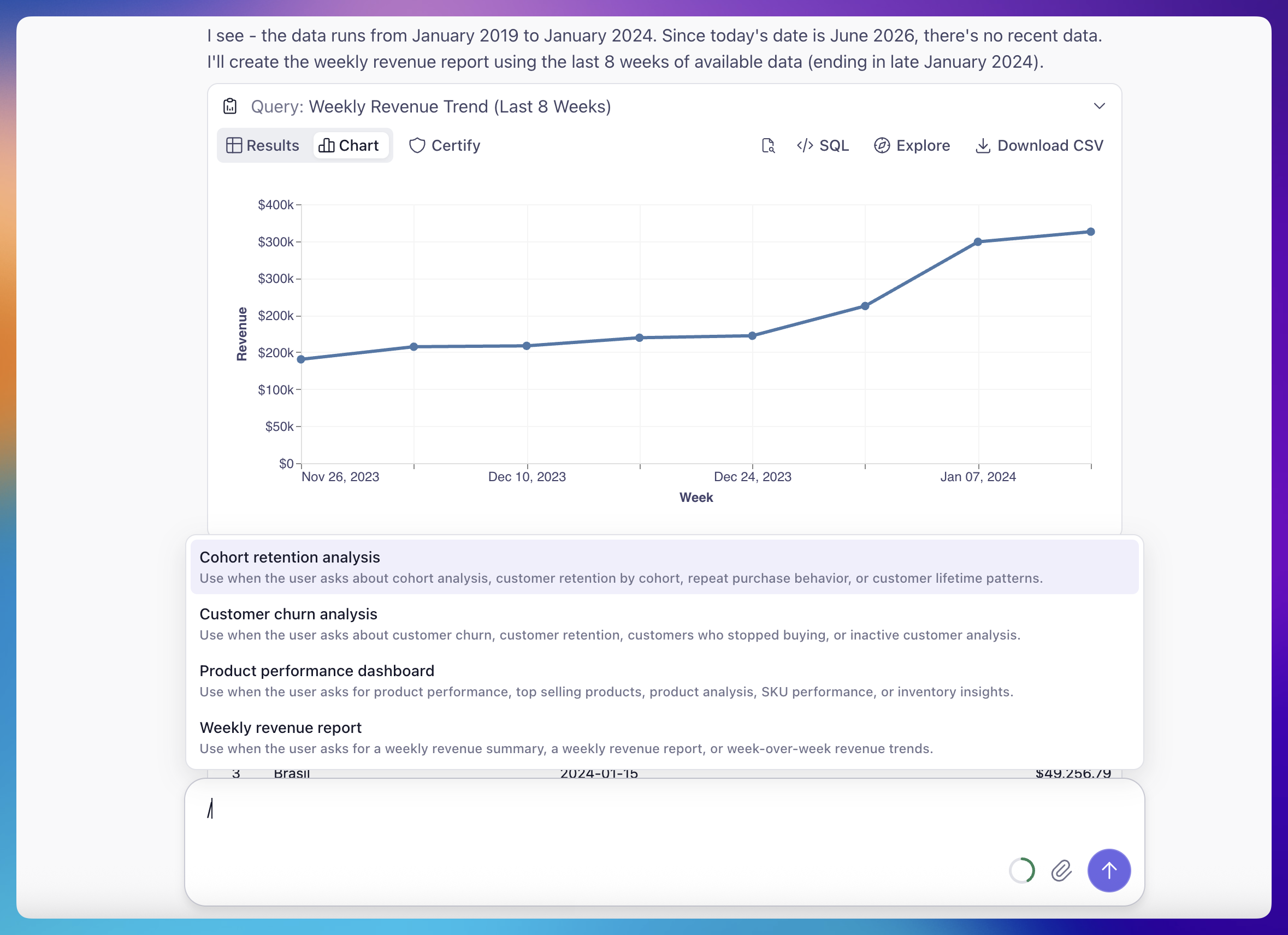
Type `/` in the chat input to open the skill menu. The menu filters as you type and is
keyboard-navigable. When skills are available, the input placeholder reads
**"Type / for skills."**
You don't always have to pick a skill explicitly. If a free-text request matches a
skill's description, the agent recognizes the intent and runs the matching skill on
its own — asking "can I get the weekly revenue summary?" may trigger a weekly revenue
report skill.
## Adding context before you run
Picking a skill — whether from a button or the `/` menu — does **not** send the message
immediately. Instead, it inserts a styled `/skill-name` token into the chat input and
keeps your cursor there.
This lets you add specifics before running. Type any extra context after the token, then
send. On send, the message becomes the skill invocation plus whatever you added. For
example:
```text theme={null}
/weekly-revenue-report for EMEA, last 6 weeks
```
runs the weekly revenue report skill, scoped to the EMEA region over the last six weeks.
Running skills is available to anyone with chat access, including **Explorer** and
**Viewer** [roles](/admin/users-and-permissions/roles-and-permissions). Authoring skills
requires data-model edit access — see [Skills](/admin/ai/skills) in the agent
configuration docs.
## Running a skill
There are three ways to run a skill from the chat input.
When skills are available, they appear as buttons in the chat empty state — one button
per skill, labeled with the skill's title. Click a button to start the skill.
Type `/` in the chat input to open the skill menu. The menu filters as you type and is
keyboard-navigable. When skills are available, the input placeholder reads
**"Type / for skills."**
You don't always have to pick a skill explicitly. If a free-text request matches a
skill's description, the agent recognizes the intent and runs the matching skill on
its own — asking "can I get the weekly revenue summary?" may trigger a weekly revenue
report skill.
## Adding context before you run
Picking a skill — whether from a button or the `/` menu — does **not** send the message
immediately. Instead, it inserts a styled `/skill-name` token into the chat input and
keeps your cursor there.
This lets you add specifics before running. Type any extra context after the token, then
send. On send, the message becomes the skill invocation plus whatever you added. For
example:
```text theme={null}
/weekly-revenue-report for EMEA, last 6 weeks
```
runs the weekly revenue report skill, scoped to the EMEA region over the last six weeks.
Running skills is available to anyone with chat access, including **Explorer** and
**Viewer** [roles](/admin/users-and-permissions/roles-and-permissions). Authoring skills
requires data-model edit access — see [Skills](/admin/ai/skills) in the agent
configuration docs.