> ## Documentation Index
> Fetch the complete documentation index at: https://cubed3-feat-druid-driver-streaming.mintlify.site/llms.txt
> Use this file to discover all available pages before exploring further.
> Understand Cube's two-level caching with in-memory query results and configurable pre-aggregations.
# Overview
Caching Overview
Cube provides a two-level caching system. The first level is **in-memory** cache
and is active by default.
Cube's [in-memory cache](#in-memory-cache) acts as a buffer for your database
when there's a burst of requests hitting the same data from multiple concurrent
users. [Pre-aggregations](#pre-aggregations) are designed to provide the
right balance between time to insight and querying performance.
To reset the **in-memory** cache in development mode, just restart the server.
The second level of caching is called **pre-aggregations**, and requires
explicit configuration to activate.
We do not recommend changing the default **in-memory** caching configuration
unless it is necessary. To speed up query performance, consider using
**pre-aggregations**.
## Pre-aggregations
Pre-aggregations is a layer of the aggregated data built and refreshed by Cube.
It can dramatically improve the query performance and provide a higher
concurrency.
To start building pre-aggregations, depending on your data source, Cube may
require write access to the [pre-aggregations schema][ref-config-preagg-schema]
in the source database. In this case, Cube first builds pre-aggregations as
tables in the source database and then exports them into the pre-aggregations
storage. Please refer to the documentation for your specific driver to learn
more about read-only support and pre-aggregation build strategies.
Pre-aggregations are defined in the data model. You can learn more about
defining pre-aggregations in [data modeling reference][ref-schema-ref-preaggs].
```yaml title="YAML" theme={null}
cubes:
- name: orders
sql_table: orders
measures:
- name: total_amount
sql: amount
type: sum
dimensions:
- name: created_at
sql: created_at
type: time
pre_aggregations:
- name: amount_by_created
measures:
- total_amount
time_dimension: created_at
granularity: month
```
```javascript title="JavaScript" theme={null}
cube(`orders`, {
sql_table: `orders`,
measures: {
total_amount: {
sql: `amount`,
type: `sum`
}
},
dimensions: {
created_at: {
sql: `created_at`,
type: `time`
}
},
pre_aggregations: {
amount_by_created: {
measures: [total_amount],
time_dimension: created_at,
granularity: `month`
}
}
})
```
## In-memory cache
Cube caches the results of executed queries using in-memory cache. The cache key
is a generated SQL statement with any existing query-dependent pre-aggregations.
Upon receiving an incoming request, Cube first checks the cache using this key.
If nothing is found in the cache, the query is executed in the database and the
result set is returned as well as updating the cache.
If an existing value is present in the cache and the `refresh_key` value for the
query hasn't changed, the cached value will be returned. Otherwise, an SQL query
will be executed against either the pre-aggregations storage or the source
database to populate the cache with the results and return them.
### Refresh Keys
Cube takes great care to prevent unnecessary queries from hitting your database.
The first stage caching system caches query results, but Cube needs a way to
know if the data powering that query result has changed. If the underlying data
isn't any different, the cached result is valid and can be returned skipping an
expensive query, but if there is a difference, the query needs to be re-run and
its result cached.
To aid with this, Cube defines a `refresh_key` for each cube. [Refresh
keys][ref-schema-ref-cube-refresh-key] are evaluated by Cube to assess if the
data needs to be refreshed.
The following `refresh_key` tells Cube to refresh data every 5 minutes:
```yaml title="YAML" theme={null}
cubes:
- name: orders
# ...
refresh_key:
every: 5 minute
```
```javascript title="JavaScript" theme={null}
cube(`orders`, {
refresh_key: {
every: `5 minute`
}
})
```
With the following `refresh_key`, Cube will only refresh the data if the value
of `MAX(created_at)` changes. By default, Cube will check this `refresh_key`
every 10 seconds:
```yaml title="YAML" theme={null}
cubes:
- name: orders
# ...
refresh_key:
sql: SELECT MAX(created_at) FROM orders
```
```javascript title="JavaScript" theme={null}
cube(`orders`, {
// ...
refresh_key: {
sql: `SELECT MAX(created_at) FROM orders`
}
})
```
By default, Cube will check and invalidate the cache in the background when in
[development mode][ref-development-mode]. In production environments, we
recommend [running a Refresh Worker as a separate
instance][ref-production-checklist-refresh].
We recommend enabling background cache invalidation in a separate Cube worker
for production deployments. Please consult the [Production
Checklist][ref-production-checklist] for more information.
If background refresh is disabled, Cube will refresh the cache during query
execution. Since this could lead to delays in responding to end-users, we
recommend always enabling background refresh.
### Default Refresh Keys
The default values for `refresh_key` are:
* `every: 2 minute` for Athena, BigQuery, Databricks, Firebolt, Presto, and Snowflake.
* `every: 10 second` for all other databases.
You can use a custom SQL query to check if a refresh is required by changing the
[`refresh_key`][ref-schema-ref-cube-refresh-key] property in a cube. Often, a
`MAX(updated_at_timestamp)` for OLTP data is a viable option, or examining a
metadata table for whatever system is managing the data to see when it last ran.
### Disabling the cache
There's no straightforward way to disable caching in Cube. The reason is that
Cube not only stores cached values but also uses the cache as a point of
synchronization and coordination between nodes in a cluster. For the sake of
design simplicity, Cube doesn't distinguish client invocations, and all calls to
the data load API are idempotent. This provides excellent reliability and
scalability but has some drawbacks. One of those load data calls can't be traced
to specific clients, and as a consequence, there's no guaranteed way for a
client to initiate a new data loading query or know if the current invocation
wasn't initiated earlier by another client. Only Refresh Key freshness
guarantees are provided in this case.
The `refresh_key` parameter can be used to control cache validity.
For closer-to-real-time use cases, [`refresh_key.every`][ref-schema-ref-cube-refresh-key]
can be set to a low value, such as `1 minute`, which is the lowest recommended option.
For truly real-time use cases, consider using [streaming pre-aggregations][ref-streaming-preaggs].
## Inspecting Queries
To inspect whether the query hits in-memory cache, pre-aggregation, or the
underlying data source, you can use the Playground or [Cube
Cloud][link-cube-cloud].
[Developer Playground][ref-dev-playground] can be used to inspect a single
query. To do that, click the "cache" button after executing the query. It will
show you the information about the `refresh_key` for the query and whether the
query uses any pre-aggregations. To inspect multiple queries or list existing
pre-aggregations, you can use [Cube Cloud][link-cube-cloud].
To inspect queries in the Cube Cloud, navigate to the "History" page. You can
filter queries by multiple parameters on this page, including whether they hit
the cache, pre-aggregations, or raw data. Additionally, you can click on the
query to see its details, such as time spent in the database, the database
queue's size at the point of query execution, generated SQL, query timeline, and
more. It will also show you the optimal pre-aggregations that could be used for
this query.
To see existing pre-aggregations, navigate to the "Pre-Aggregations" page in the
Cube Cloud. The table shows all the pre-aggregations, the last refresh
timestamp, and the time spent to build the pre-aggregation. You can also inspect
every pre-aggregation's details: the list of queries it serves and all its
versions.
### Cache type
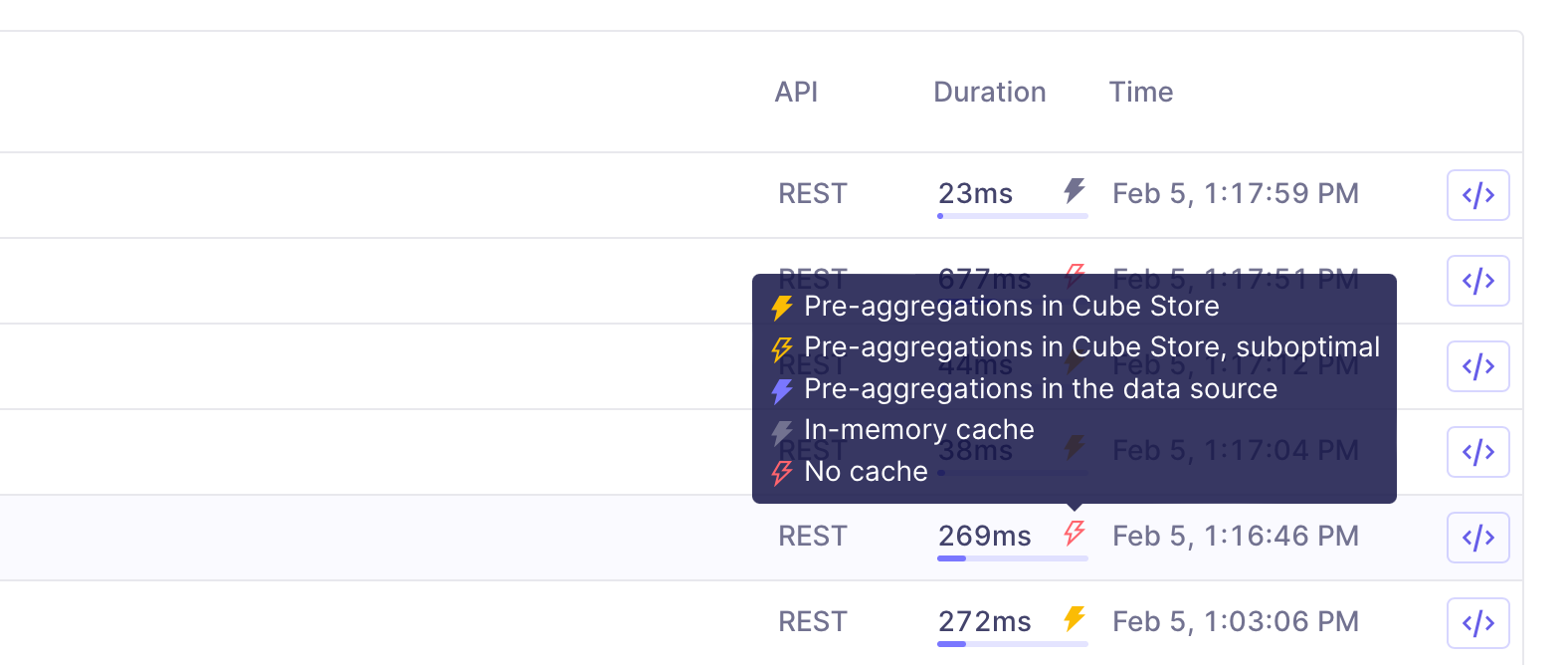
Any query that is fulfilled by Cube will use one of the following cache types:
* **[Pre-aggregations](#pre-aggregations) in Cube Store.** This cache type
indicates that the query utilized existing pre-aggregations in Cube Store,
so it did not need to go to the database for processing.
* **Pre-aggregations in Cube Store with a suboptimal query plan.** This cache
type indicates that the query ultilized pre-aggregations in Cube Store,
but that it's possible to get a performance boost by [using indexes][ref-indexes].
* **Pre-aggregations in the data source.** This cache type indicates that
the query utilized pre-aggregations from in the upstream data source.
These queries could gain a performance boost by using Cube Store as [pre-aggregation
storage][ref-storage].
* **[In-memory cache.](#in-memory-cache)** This cache type indicates that the
results were retrieved from Cube's in-memory cache. All query results
are stored in Cube's in-memory cache, and if the same query is
run within a certain time frame, the results will be retrieved from in-memory
cache instead of being processed on the database or in Cube Store. This is the
fastest query retrieval method, but it requires that the exact same query was
run very recently.
* **No cache.** This cache type indicates that the query was processed in the upstream
data source and was not accelerated using pre-aggregations. These queries could have
a significant performance boost if pre-aggregations and Cube Store were utilized.
In [Query History][ref-query-history] and throughout Cube Cloud, colored bolt
icons are used to indicate the cache type. Also, [Performance
Insights][ref-perf-insights] provide an overview of API requests by specific
cache types.
 [link-cube-cloud]: https://cube.dev/cloud
[ref-config-preagg-schema]: /reference/configuration/config#preaggregationsschema
[ref-dev-playground]: /docs/explore-analyze/playground
[ref-development-mode]: /docs/data-modeling/dev-mode
[ref-production-checklist]: /cube-core/running-in-production
[ref-production-checklist-refresh]: /cube-core/running-in-production#set-up-refresh-worker
[ref-schema-ref-cube-refresh-key]: /reference/data-modeling/cube#refresh_key
[ref-schema-ref-preaggs]: /reference/data-modeling/pre-aggregations
[ref-streaming-preaggs]: /docs/pre-aggregations/lambda-pre-aggregations#batch-and-streaming-data
[ref-query-history]: /admin/monitoring/query-history#inspecting-api-queries
[ref-perf-insights]: /admin/monitoring/performance#cache-type
[ref-indexes]: /docs/pre-aggregations/using-pre-aggregations#using-indexes
[ref-storage]: /docs/pre-aggregations/using-pre-aggregations#pre-aggregations-storage
[link-cube-cloud]: https://cube.dev/cloud
[ref-config-preagg-schema]: /reference/configuration/config#preaggregationsschema
[ref-dev-playground]: /docs/explore-analyze/playground
[ref-development-mode]: /docs/data-modeling/dev-mode
[ref-production-checklist]: /cube-core/running-in-production
[ref-production-checklist-refresh]: /cube-core/running-in-production#set-up-refresh-worker
[ref-schema-ref-cube-refresh-key]: /reference/data-modeling/cube#refresh_key
[ref-schema-ref-preaggs]: /reference/data-modeling/pre-aggregations
[ref-streaming-preaggs]: /docs/pre-aggregations/lambda-pre-aggregations#batch-and-streaming-data
[ref-query-history]: /admin/monitoring/query-history#inspecting-api-queries
[ref-perf-insights]: /admin/monitoring/performance#cache-type
[ref-indexes]: /docs/pre-aggregations/using-pre-aggregations#using-indexes
[ref-storage]: /docs/pre-aggregations/using-pre-aggregations#pre-aggregations-storage