> ## Documentation Index
> Fetch the complete documentation index at: https://cubed3-feat-druid-driver-streaming.mintlify.site/llms.txt
> Use this file to discover all available pages before exploring further.
# Using Cube with dbt
> Layer Cube cubes and views on dbt-built warehouse models, aligning documentation patterns with dimensions, measures, joins, and downstream APIs.
[dbt][link-dbt-docs] is a popular data integration tool used by many Cube
users to transform the data in the data warehouse before bringing it to the
semantic layer.
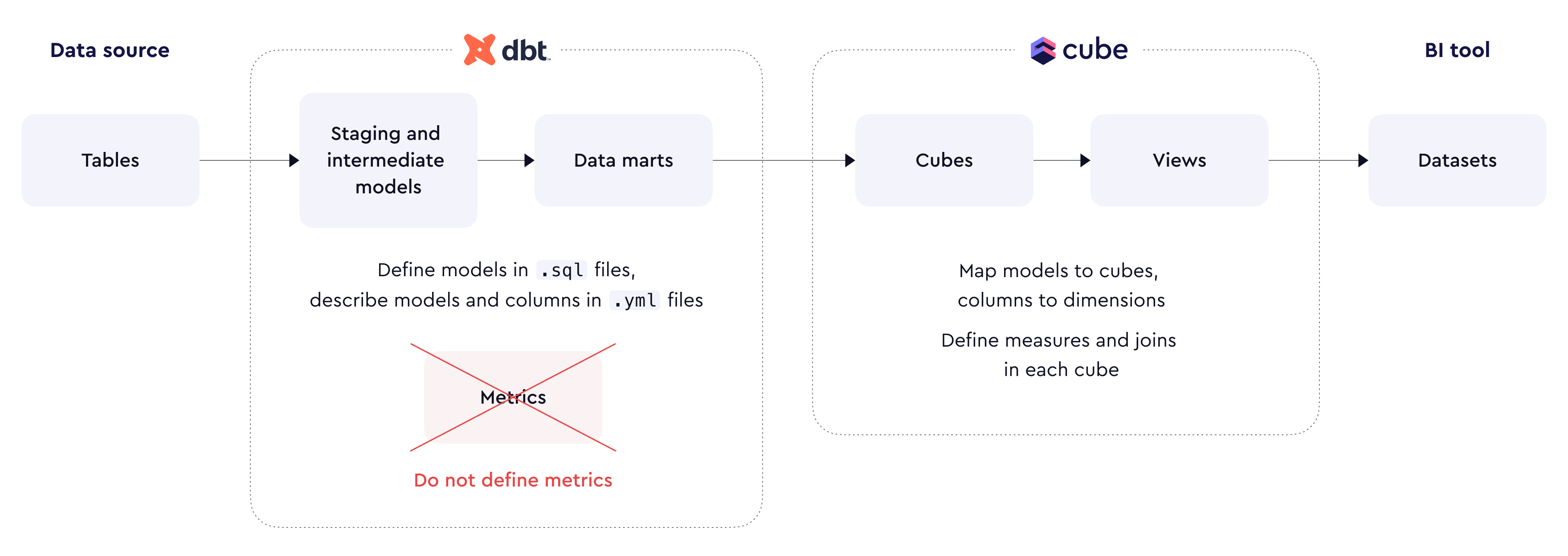 Usually, dbt projects are [focused][link-dbt-docs-structure] on creating
staging and intermediate models and finally using them to define normalized
[data marts][link-dbt-docs-structure-marts] for the semantic layer. Often,
these marts would be described in `.yml` files as
[models][link-dbt-docs-models] with [columns][link-dbt-docs-columns] and
other properties.
Cube projects usually define [cubes][ref-ref-cubes] on top of dbt models,
materialized as tables or views in your data warehouse, bring columns as
[dimensions][ref-ref-dimensions], enrich them with
[measures][ref-ref-measures], [joins][ref-ref-joins], and
[pre-aggregations][ref-ref-pre-aggs]. Finally, the facade of the data model
is created with [views][ref-ref-views] and exposed to downstream tools via
a rich [set of APIs][ref-apis].
```yaml title="YAML" theme={null}
cubes:
- name: orders
- sql_table: my_dbt_schema.my_dbt_orders_model
dimensions: []
measures: []
joins: []
pre_aggregations: []
```
```javascript title="JavaScript" theme={null}
cube(`orders`, {
sql_table: `my_dbt_schema.my_dbt_orders_model`,
dimensions: {},
measures: {},
joins: {},
pre_aggregations: {}
})
```
Cube provides a convenient `cube_dbt` package to simplify [data model
integration][self-integration].
## Data transformation
### Data types
Cube provides a single [`time` type][ref-time-type] to model time
dimensions. However, raw data can contain temporal columns in various
formats, e.g., as `TIMESTAMP`, `DATETIME`, `DATE`, etc. It's a best practice
to convert all temporal columns in dbt models into the `TIMESTAMP` format.
### Refresh keys
It's convenient to have an `updated_at` column in every dbt model so that
the [refresh keys][ref-refresh-keys] of cubes would be defined as follows:
```sql theme={null}
SELECT MAX(updated_at)
FROM orders
```
When the source data doesn't have a column that can be used to track updates
reliably and dbt [snapshots](https://docs.getdbt.com/docs/build/snapshots) are used,
`dbt_valid_from` and `dbt_valid_to` columns can be used to define refresh keys, e.g.:
```sql theme={null}
SELECT CONCAT(COUNT(*), MAX(dbt_valid_from), MIN(dbt_valid_to))
FROM orders_snapshot
```
### Pre-aggregations
When [pre-aggregations][ref-pre-aggs] are implemented, they would be
refreshed using their own [refresh keys][ref-pre-aggs-refresh-keys].
If applicable, consider configuring a data orchestration tool like Airflow,
Dagster, or Prefect so that it triggers pre-aggregation refresh when dbt
models are updated via the [Orchestration API][ref-orchestration-api].
## Data model integration
[`cube_dbt` package][ref-cube-dbt] simplifies defining the data model on
top of dbt models. It provides convenient tools for loading the metadata
of a dbt project, inspecting dbt models, and rendering them as cubes with
dimensions. It's designed to work with [dynamic data models][dynamic-models]
built with YAML, Jinja, and Python.
Usually, the integration would include the following steps:
* Load the metadata of your dbt project.
* Select relevant dbt models.
* Render dbt models as cubes with dimensions.
* Enrich these cubes with measures, joins, pre-aggregations, etc.
### Installation
Add the `cube_dbt` package to the `requirements.txt` file in the root
directory of your Cube project. See the [`cube_dbt` package][ref-cube-dbt]
documentation for details.
### Loading dbt projects
`cube_dbt` package loads the metadata of dbt projects from the
[`manifest.json` file][dbt-manifest]. Any dbt command that parses the dbt
project would produce this file, including `dbt build` and `dbt run`.
Loading metadata from dbt Cloud might be implemented in further releases of
the `cube_dbt` package.
In the most basic scenario, you can commit the `manifest.json` file to the
source code of your Cube project and load it as a local file. Here's an
example source code of the `globals.py` file in your data model folder:
```python theme={null}
from cube_dbt import Dbt
dbt = Dbt.from_file('./manifest.json')
```
In a less basic scenario, you can put the `manifest.json` file to a remote
storage and load it by its URL:
```python theme={null}
from cube_dbt import Dbt
manifest_url = 'https://cube-dbt-integration.s3.amazonaws.com/manifest.json'
dbt = Dbt.from_url(manifest_url)
```
Actually, you can obtain the contents of the `manifest.json` file in any way
that works for you. parse the JSON into a dictionary, and load it directly.
This is particularly useful when loading `manifest.json` from non-public
remote storage using packages like [`smart-open`][link-smart-open] or
[`boto3`][link-boto3].
```python theme={null}
from cube_dbt import Dbt
from smart_open import open
import json
manifest_url = 'https://cube-dbt-integration.s3.amazonaws.com/manifest.json'
manifest = None
with open(manifest_url) as file:
manifest_json = file.read()
manifest = json.loads(manifest_json)
dbt = Dbt(manifest)
```
### Selecting dbt models
By default, `cube_dbt` would load all dbt models, excluding
[ephemeral][link-dbt-materializations] ones. You can also cherry-pick dbt
models and load only some of them.
For example, you can load only models under a directory or directories.
This is particularly useful if you keep your data marts under
`models/marts/` as [advised by dbt][link-dbt-docs-structure-marts].
```python theme={null}
from cube_dbt import Dbt
manifest_url = 'https://cube-dbt-integration.s3.amazonaws.com/manifest.json'
dbt = Dbt.from_url(manifest_url).filter(paths=['marts/'])
```
You can also load only models with certain tags. This is useful if you'd
like to have more granular controls over dbt models exposed to the semantic
layer:
```python theme={null}
from cube_dbt import Dbt
manifest_url = 'https://cube-dbt-integration.s3.amazonaws.com/manifest.json'
dbt = Dbt.from_url(manifest_url).filter(tags=['cube'])
```
Finally, you can load only select models by their names:
```python theme={null}
from cube_dbt import Dbt
manifest_url = 'https://cube-dbt-integration.s3.amazonaws.com/manifest.json'
dbt = Dbt.from_url(manifest_url).filter(names=['orders', 'customers'])
```
### Rendering dbt models
`cube_dbt` provides convenient tools to render dbt models in YAML files
with Jinja. For that, dbt models should be made
[accessible][ref-template-context] from Jinja templates. Here, they are
exposed via `dbt_models` and `dbt_model` functions:
```python theme={null}
from cube import TemplateContext
from cube_dbt import Dbt
manifest_url = 'https://cube-dbt-integration.s3.amazonaws.com/manifest.json'
dbt = Dbt.from_url(manifest_url).filter(paths=['marts/'])
template = TemplateContext()
@template.function('dbt_models')
def dbt_models():
return dbt.models
@template.function('dbt_model')
def dbt_model(name):
return dbt.model(name)
```
You can use the `dbt_models` function in a Jinja template to iterate over
all models and output them as YAML. Note the convenient
[`as_cube`][ref-cube-dbt-as-cube] and
[`as_dimensions`][ref-cube-dbt-as-dimensions] methods that would render
each model with correct `name` and `sql_table` and also render each column
as a dimension.
```yaml theme={null}
cubes:
{% for model in dbt_models() %}
- {{ model.as_cube() }}
dimensions:
{{ model.as_dimensions(skip=['very_private_column']) }}
measures:
- name: count
type: count
{% endfor %}
```
`cube_dbt` does its best to [translate `data_type`][ref-cube-dbt-data-type]
properties of columns to correct [dimension types][ref-dimension-types].
Also, if a column is tagged as `primary_key` in its properties, it would
automatically become a [primary key][ref-primary-key] dimension. You can
also prevent select columns from being rendered as dimensions with `skip`.
You can even iterate over columns on your own and render them as you wish:
```yaml theme={null}
cubes:
{% for model in dbt_models() %}
- {{ model.as_cube() }}
dimensions:
{% for column in model.columns %}
- name: "{{ column.name }}"
sql: "{{ column.sql }}"
type: "{{ column.type }}"
description: "{{ column.description }}"
meta:
source: dbt
{% endfor %}
measures:
- name: count
type: count
{% endfor %}
```
However, in a real-world scenario, iterating over all dbt models and
rendering them in a single YAML file is inconvenient since it would be
difficult to enrich each rendered cube with its own measures, joins, etc.
### Enriching the data model
It's best practice to render each dbt model (or data mart) as cube in its
own file. It simplifies Jinja templates and improves the maintainability
of the data model. Consider the following cube:
```yml theme={null}
{% set model = dbt_model('orders') %}
cubes:
- {{ model.as_cube() }}
dimensions:
{{ model.as_dimensions() }}
# Model-specific measures
measures:
- name: count
type: count
- name: statuses
sql: "STRING_AGG({status}, ',')"
type: string
# Model-specific joins
joins:
- name: users
sql: "{CUBE.user_id} = {users.id}"
relationship: many_to_one
# Model-specific pre-aggregations
pre_aggregations:
- name: count_by_users
measures:
- CUBE.count
dimensions:
- users.full_name
```
You can easily customize measures, joins, and pre-aggregation that apply
to this very cube, mapped to the `orders` dbt model, and have it
side-by-side with other cubes, even of they don't come from dbt.
To inspect rendered cubes, you can use [Visual Modeler][ref-visual-model],
[Playground][ref-playground], or the [`meta` endpoint][ref-rest-api-meta]
of the REST (JSON) API.
[dynamic-models]: /docs/data-modeling/dynamic/jinja
[dbt-manifest]: https://docs.getdbt.com/reference/artifacts/manifest-json
[self-integration]: /recipes/data-modeling/dbt#data-model-integration
[ref-ref-cubes]: /reference/data-modeling/cube
[ref-ref-dimensions]: /reference/data-modeling/dimensions
[ref-ref-measures]: /reference/data-modeling/measures
[ref-ref-joins]: /reference/data-modeling/joins
[ref-ref-pre-aggs]: /reference/data-modeling/pre-aggregations
[ref-ref-views]: /reference/data-modeling/view
[ref-apis]: /reference
[ref-time-type]: /reference/data-modeling/dimensions#type
[ref-refresh-keys]: /reference/data-modeling/cube#refresh_key
[ref-pre-aggs]: /docs/pre-aggregations/using-pre-aggregations
[ref-pre-aggs-refresh-keys]: /docs/pre-aggregations/using-pre-aggregations#refresh-strategy
[ref-orchestration-api]: /reference/orchestration-api
[ref-cube-dbt]: /reference/data-modeling/cube_dbt
[ref-cube-dbt-as-cube]: /reference/data-modeling/cube_dbt#modelas_cube
[ref-cube-dbt-as-dimensions]: /reference/data-modeling/cube_dbt#modelas_dimensions
[ref-cube-dbt-data-type]: /reference/data-modeling/cube_dbt#columntype
[ref-template-context]: /reference/data-modeling/cube-package#templatecontext-class
[ref-primary-key]: /reference/data-modeling/dimensions#primary_key
[ref-dimension-types]: /reference/data-modeling/dimensions#type
[ref-visual-model]: /docs/data-modeling/visual-modeler
[ref-playground]: /docs/explore-analyze/playground
[ref-rest-api-meta]: /reference/core-data-apis/rest-api/reference#base_path/v1/meta
[link-dbt-docs]: https://docs.getdbt.com/docs/build/projects
[link-dbt-docs-structure]: https://docs.getdbt.com/guides/best-practices/how-we-structure/1-guide-overview#guide-structure-overview
[link-dbt-docs-structure-marts]: https://docs.getdbt.com/guides/best-practices/how-we-structure/5-semantic-layer-marts
[link-dbt-docs-models]: https://docs.getdbt.com/reference/model-properties
[link-dbt-docs-columns]: https://docs.getdbt.com/reference/resource-properties/columns
[link-dbt-materializations]: https://docs.getdbt.com/docs/build/materializations
[link-smart-open]: https://pypi.org/project/smart-open/
[link-boto3]: https://boto3.amazonaws.com/v1/documentation/api/latest/guide/s3-examples.html
Usually, dbt projects are [focused][link-dbt-docs-structure] on creating
staging and intermediate models and finally using them to define normalized
[data marts][link-dbt-docs-structure-marts] for the semantic layer. Often,
these marts would be described in `.yml` files as
[models][link-dbt-docs-models] with [columns][link-dbt-docs-columns] and
other properties.
Cube projects usually define [cubes][ref-ref-cubes] on top of dbt models,
materialized as tables or views in your data warehouse, bring columns as
[dimensions][ref-ref-dimensions], enrich them with
[measures][ref-ref-measures], [joins][ref-ref-joins], and
[pre-aggregations][ref-ref-pre-aggs]. Finally, the facade of the data model
is created with [views][ref-ref-views] and exposed to downstream tools via
a rich [set of APIs][ref-apis].
```yaml title="YAML" theme={null}
cubes:
- name: orders
- sql_table: my_dbt_schema.my_dbt_orders_model
dimensions: []
measures: []
joins: []
pre_aggregations: []
```
```javascript title="JavaScript" theme={null}
cube(`orders`, {
sql_table: `my_dbt_schema.my_dbt_orders_model`,
dimensions: {},
measures: {},
joins: {},
pre_aggregations: {}
})
```
Cube provides a convenient `cube_dbt` package to simplify [data model
integration][self-integration].
## Data transformation
### Data types
Cube provides a single [`time` type][ref-time-type] to model time
dimensions. However, raw data can contain temporal columns in various
formats, e.g., as `TIMESTAMP`, `DATETIME`, `DATE`, etc. It's a best practice
to convert all temporal columns in dbt models into the `TIMESTAMP` format.
### Refresh keys
It's convenient to have an `updated_at` column in every dbt model so that
the [refresh keys][ref-refresh-keys] of cubes would be defined as follows:
```sql theme={null}
SELECT MAX(updated_at)
FROM orders
```
When the source data doesn't have a column that can be used to track updates
reliably and dbt [snapshots](https://docs.getdbt.com/docs/build/snapshots) are used,
`dbt_valid_from` and `dbt_valid_to` columns can be used to define refresh keys, e.g.:
```sql theme={null}
SELECT CONCAT(COUNT(*), MAX(dbt_valid_from), MIN(dbt_valid_to))
FROM orders_snapshot
```
### Pre-aggregations
When [pre-aggregations][ref-pre-aggs] are implemented, they would be
refreshed using their own [refresh keys][ref-pre-aggs-refresh-keys].
If applicable, consider configuring a data orchestration tool like Airflow,
Dagster, or Prefect so that it triggers pre-aggregation refresh when dbt
models are updated via the [Orchestration API][ref-orchestration-api].
## Data model integration
[`cube_dbt` package][ref-cube-dbt] simplifies defining the data model on
top of dbt models. It provides convenient tools for loading the metadata
of a dbt project, inspecting dbt models, and rendering them as cubes with
dimensions. It's designed to work with [dynamic data models][dynamic-models]
built with YAML, Jinja, and Python.
Usually, the integration would include the following steps:
* Load the metadata of your dbt project.
* Select relevant dbt models.
* Render dbt models as cubes with dimensions.
* Enrich these cubes with measures, joins, pre-aggregations, etc.
### Installation
Add the `cube_dbt` package to the `requirements.txt` file in the root
directory of your Cube project. See the [`cube_dbt` package][ref-cube-dbt]
documentation for details.
### Loading dbt projects
`cube_dbt` package loads the metadata of dbt projects from the
[`manifest.json` file][dbt-manifest]. Any dbt command that parses the dbt
project would produce this file, including `dbt build` and `dbt run`.
Loading metadata from dbt Cloud might be implemented in further releases of
the `cube_dbt` package.
In the most basic scenario, you can commit the `manifest.json` file to the
source code of your Cube project and load it as a local file. Here's an
example source code of the `globals.py` file in your data model folder:
```python theme={null}
from cube_dbt import Dbt
dbt = Dbt.from_file('./manifest.json')
```
In a less basic scenario, you can put the `manifest.json` file to a remote
storage and load it by its URL:
```python theme={null}
from cube_dbt import Dbt
manifest_url = 'https://cube-dbt-integration.s3.amazonaws.com/manifest.json'
dbt = Dbt.from_url(manifest_url)
```
Actually, you can obtain the contents of the `manifest.json` file in any way
that works for you. parse the JSON into a dictionary, and load it directly.
This is particularly useful when loading `manifest.json` from non-public
remote storage using packages like [`smart-open`][link-smart-open] or
[`boto3`][link-boto3].
```python theme={null}
from cube_dbt import Dbt
from smart_open import open
import json
manifest_url = 'https://cube-dbt-integration.s3.amazonaws.com/manifest.json'
manifest = None
with open(manifest_url) as file:
manifest_json = file.read()
manifest = json.loads(manifest_json)
dbt = Dbt(manifest)
```
### Selecting dbt models
By default, `cube_dbt` would load all dbt models, excluding
[ephemeral][link-dbt-materializations] ones. You can also cherry-pick dbt
models and load only some of them.
For example, you can load only models under a directory or directories.
This is particularly useful if you keep your data marts under
`models/marts/` as [advised by dbt][link-dbt-docs-structure-marts].
```python theme={null}
from cube_dbt import Dbt
manifest_url = 'https://cube-dbt-integration.s3.amazonaws.com/manifest.json'
dbt = Dbt.from_url(manifest_url).filter(paths=['marts/'])
```
You can also load only models with certain tags. This is useful if you'd
like to have more granular controls over dbt models exposed to the semantic
layer:
```python theme={null}
from cube_dbt import Dbt
manifest_url = 'https://cube-dbt-integration.s3.amazonaws.com/manifest.json'
dbt = Dbt.from_url(manifest_url).filter(tags=['cube'])
```
Finally, you can load only select models by their names:
```python theme={null}
from cube_dbt import Dbt
manifest_url = 'https://cube-dbt-integration.s3.amazonaws.com/manifest.json'
dbt = Dbt.from_url(manifest_url).filter(names=['orders', 'customers'])
```
### Rendering dbt models
`cube_dbt` provides convenient tools to render dbt models in YAML files
with Jinja. For that, dbt models should be made
[accessible][ref-template-context] from Jinja templates. Here, they are
exposed via `dbt_models` and `dbt_model` functions:
```python theme={null}
from cube import TemplateContext
from cube_dbt import Dbt
manifest_url = 'https://cube-dbt-integration.s3.amazonaws.com/manifest.json'
dbt = Dbt.from_url(manifest_url).filter(paths=['marts/'])
template = TemplateContext()
@template.function('dbt_models')
def dbt_models():
return dbt.models
@template.function('dbt_model')
def dbt_model(name):
return dbt.model(name)
```
You can use the `dbt_models` function in a Jinja template to iterate over
all models and output them as YAML. Note the convenient
[`as_cube`][ref-cube-dbt-as-cube] and
[`as_dimensions`][ref-cube-dbt-as-dimensions] methods that would render
each model with correct `name` and `sql_table` and also render each column
as a dimension.
```yaml theme={null}
cubes:
{% for model in dbt_models() %}
- {{ model.as_cube() }}
dimensions:
{{ model.as_dimensions(skip=['very_private_column']) }}
measures:
- name: count
type: count
{% endfor %}
```
`cube_dbt` does its best to [translate `data_type`][ref-cube-dbt-data-type]
properties of columns to correct [dimension types][ref-dimension-types].
Also, if a column is tagged as `primary_key` in its properties, it would
automatically become a [primary key][ref-primary-key] dimension. You can
also prevent select columns from being rendered as dimensions with `skip`.
You can even iterate over columns on your own and render them as you wish:
```yaml theme={null}
cubes:
{% for model in dbt_models() %}
- {{ model.as_cube() }}
dimensions:
{% for column in model.columns %}
- name: "{{ column.name }}"
sql: "{{ column.sql }}"
type: "{{ column.type }}"
description: "{{ column.description }}"
meta:
source: dbt
{% endfor %}
measures:
- name: count
type: count
{% endfor %}
```
However, in a real-world scenario, iterating over all dbt models and
rendering them in a single YAML file is inconvenient since it would be
difficult to enrich each rendered cube with its own measures, joins, etc.
### Enriching the data model
It's best practice to render each dbt model (or data mart) as cube in its
own file. It simplifies Jinja templates and improves the maintainability
of the data model. Consider the following cube:
```yml theme={null}
{% set model = dbt_model('orders') %}
cubes:
- {{ model.as_cube() }}
dimensions:
{{ model.as_dimensions() }}
# Model-specific measures
measures:
- name: count
type: count
- name: statuses
sql: "STRING_AGG({status}, ',')"
type: string
# Model-specific joins
joins:
- name: users
sql: "{CUBE.user_id} = {users.id}"
relationship: many_to_one
# Model-specific pre-aggregations
pre_aggregations:
- name: count_by_users
measures:
- CUBE.count
dimensions:
- users.full_name
```
You can easily customize measures, joins, and pre-aggregation that apply
to this very cube, mapped to the `orders` dbt model, and have it
side-by-side with other cubes, even of they don't come from dbt.
To inspect rendered cubes, you can use [Visual Modeler][ref-visual-model],
[Playground][ref-playground], or the [`meta` endpoint][ref-rest-api-meta]
of the REST (JSON) API.
[dynamic-models]: /docs/data-modeling/dynamic/jinja
[dbt-manifest]: https://docs.getdbt.com/reference/artifacts/manifest-json
[self-integration]: /recipes/data-modeling/dbt#data-model-integration
[ref-ref-cubes]: /reference/data-modeling/cube
[ref-ref-dimensions]: /reference/data-modeling/dimensions
[ref-ref-measures]: /reference/data-modeling/measures
[ref-ref-joins]: /reference/data-modeling/joins
[ref-ref-pre-aggs]: /reference/data-modeling/pre-aggregations
[ref-ref-views]: /reference/data-modeling/view
[ref-apis]: /reference
[ref-time-type]: /reference/data-modeling/dimensions#type
[ref-refresh-keys]: /reference/data-modeling/cube#refresh_key
[ref-pre-aggs]: /docs/pre-aggregations/using-pre-aggregations
[ref-pre-aggs-refresh-keys]: /docs/pre-aggregations/using-pre-aggregations#refresh-strategy
[ref-orchestration-api]: /reference/orchestration-api
[ref-cube-dbt]: /reference/data-modeling/cube_dbt
[ref-cube-dbt-as-cube]: /reference/data-modeling/cube_dbt#modelas_cube
[ref-cube-dbt-as-dimensions]: /reference/data-modeling/cube_dbt#modelas_dimensions
[ref-cube-dbt-data-type]: /reference/data-modeling/cube_dbt#columntype
[ref-template-context]: /reference/data-modeling/cube-package#templatecontext-class
[ref-primary-key]: /reference/data-modeling/dimensions#primary_key
[ref-dimension-types]: /reference/data-modeling/dimensions#type
[ref-visual-model]: /docs/data-modeling/visual-modeler
[ref-playground]: /docs/explore-analyze/playground
[ref-rest-api-meta]: /reference/core-data-apis/rest-api/reference#base_path/v1/meta
[link-dbt-docs]: https://docs.getdbt.com/docs/build/projects
[link-dbt-docs-structure]: https://docs.getdbt.com/guides/best-practices/how-we-structure/1-guide-overview#guide-structure-overview
[link-dbt-docs-structure-marts]: https://docs.getdbt.com/guides/best-practices/how-we-structure/5-semantic-layer-marts
[link-dbt-docs-models]: https://docs.getdbt.com/reference/model-properties
[link-dbt-docs-columns]: https://docs.getdbt.com/reference/resource-properties/columns
[link-dbt-materializations]: https://docs.getdbt.com/docs/build/materializations
[link-smart-open]: https://pypi.org/project/smart-open/
[link-boto3]: https://boto3.amazonaws.com/v1/documentation/api/latest/guide/s3-examples.html