> ## Documentation Index
> Fetch the complete documentation index at: https://cubed3-feat-druid-driver-streaming.mintlify.site/llms.txt
> Use this file to discover all available pages before exploring further.
# Cube Core
> Connect any Postgres-compatible client or BI tool to Cube using the Postgres-protocol SQL API.
SQL API
The SQL API enables Cube to deliver data over the [Postgres-compatible
protocol][postgres-protocol] to a wide range of [data visualization tools][ref-dataviz-tools].
In general, if an application connects to [PostgreSQL][link-postgres] database,
it can connect to Cube as well.
See [SQL API reference][ref-ref-sql-api] for the list of supported SQL commands,
functions, and operators. Also, check [query format][ref-sql-query-format] for
details about supported queries.
## Transport
The SQL API supports the following transports:
| Transport | Description | When to use |
| --------- | ---------------------------------------------------------------------------- | -------------------------------------------------------------------------------------------------------------------- |
| Postgres | Same protocol that is used by the `psql` utility and other Postgres clients | Use by default |
| HTTP | JSON-based protocol that is also used by the [REST (JSON) API][ref-rest-api] | Use when you need to run a SQL API query from an embedded analytics application and REST (JSON) API is not an option |
### Postgres protocol
You can use the [`psql` utility][link-psql] to connect to the SQL API:
```bash theme={null}
# Cube Core
PGPASSWORD=password \
psql -h localhost \
-p 15432 \
-U user cube
```
```bash theme={null}
# Cube Cloud
PGPASSWORD=password \
psql -h awesome-ecom.sql.gcp-us-central1.cubecloudapp.dev \
-p 5432 \
-U cube awesome-ecom
```
Then, you can run queries in the Postgres dialect, just like the following one:
```sql theme={null}
SELECT
users.state,
users.city,
orders.status,
MEASURE(orders.count)
FROM orders
CROSS JOIN users
WHERE
users.state != 'us-wa'
AND orders.created_at BETWEEN '2020-01-01' AND '2021-01-01'
GROUP BY 1, 2, 3
LIMIT 10;
```
You can also introspect the data model in a Postgres-native way by querying [tables
in `information_schema`][link-postgres-information-schema] or using [backslash
commands][link-postgres-backslash-commands]:
```sql theme={null}
SELECT *
FROM information_schema.tables
WHERE table_schema = 'public';
```
```sql theme={null}
\d
```
### HTTP protocol
You can use the `curl` utility to run a SQL API query over the HTTP protocol:
```bash theme={null}
curl \
-X POST \
-H "Authorization: TOKEN" \
-H "Content-Type: application/json" \
-d '{"query": "SELECT 123 AS value UNION ALL SELECT 456 AS value UNION ALL SELECT 789 AS value"}' \
http://localhost:4000/cubejs-api/v1/cubesql
```
See the [`/v1/cubesql` endpoint][ref-rest-api-cubesql] reference for more details.
## Fundamentals
In the SQL API, each cube or view from the [data model][ref-data-model-concepts]
is represented as a table. Measures, dimensions, and segments are represented as
columns in these tables. SQL API can execute [regular queries][ref-regular-queries],
[queries with post-processing][ref-queries-wpp], and [queries with
pushdown][ref-queries-wpd] that can reference these tables and columns.
Under the hood, the SQL API uses [Apache DataFusion][link-datafusion] as
its query engine. It's responsible for query planning and execution.
As part of query planning, the SQL API also uses [egg][link-egg] (an [e-graph term
rewriting][link-egraphs] library) to analyze incoming SQL queries and find the best
query plan out of a wide variety of possible plans to execute.
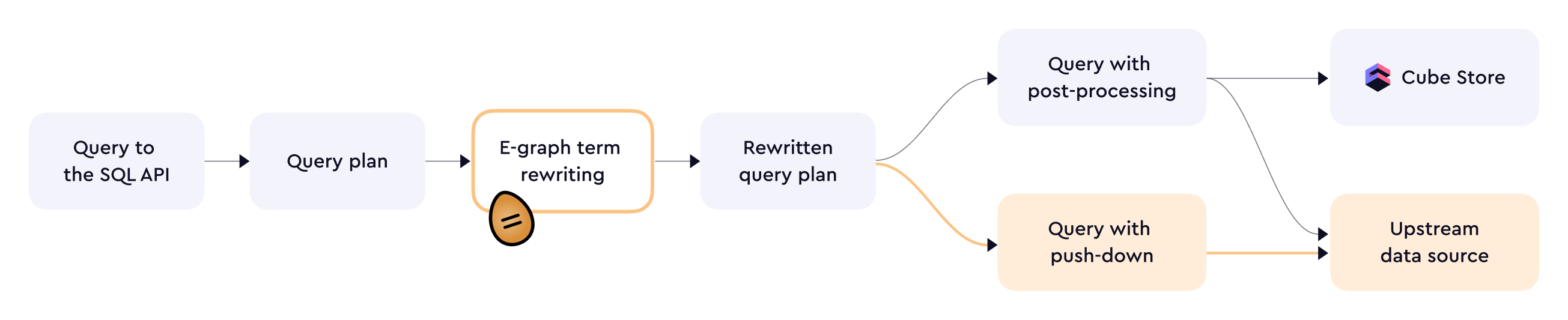 Overall, query planning is a seamless process.
SQL API does its best to execute a query as a [regular query][ref-regular-queries]
or a [query with post-processing][ref-queries-wpp]. If that is not possible,
then the query would be executed as a [query with pushdown][ref-queries-wpd].
There are trade-offs associated with each query type:
| Query type | In-memory cache | Pre-aggregations | SQL support |
| ----------------------------------------------- | --------------- | ---------------- | --------------- |
| [Regular queries][ref-regular-queries] | ✅ Used | ✅ Used | 🟡 Very limited |
| [Queries with post-processing][ref-queries-wpp] | ✅ Used | ✅ Used | 🟡 Limited |
| [Queries with pushdown][ref-queries-wpd] | ✅ Used | ❌ Not used | ✅ Extensive |
[Read more](https://cube.dev/blog/query-push-down-in-cubes-semantic-layer) about Query pushdown in the SQL API in the blog.
## Configuration
### Cube Core
**SQL API is disabled by default.** To enable the SQL API, set [`CUBEJS_PG_SQL_PORT`](/reference/configuration/environment-variables#cubejs_pg_sql_port)
to a port number you'd like to connect to with a Postgres-compatible tool.
| Credential | Environment variable, etc. |
| :--------- | :-------------------------------------------------------------------------------------------------- |
| Host | Host you're running Cube at |
| Port | Set via [`CUBEJS_PG_SQL_PORT`](/reference/configuration/environment-variables#cubejs_pg_sql_port) |
| User name | Set via [`CUBEJS_SQL_USER`](/reference/configuration/environment-variables#cubejs_sql_user) |
| Password | Set via [`CUBEJS_SQL_PASSWORD`](/reference/configuration/environment-variables#cubejs_sql_password) |
| Database | Any valid string, e.g., `cube` |
You can also use
[`checkSqlAuth`][ref-config-checksqlauth],
[`canSwitchSqlUser`][ref-config-canswitchsqluser], and [`CUBEJS_SQL_SUPER_USER`](/reference/configuration/environment-variables#cubejs_sql_super_user)
to configure [custom authentication][ref-sql-api-auth].
#### Example
The following Docker Compose file will run Cube with the SQL API enabled on
port 15432, accessible using `user` as the user name, `password` as the password,
and any string as the database name:
```yamltitle="docker-compose.yml" theme={null}
services:
cube:
image: cubejs/cube:latest
ports:
- 4000:4000
- 15432:15432
environment:
- CUBEJS_DEV_MODE=true
- CUBEJS_API_SECRET=SECRET
- CUBEJS_DB_USER=cube
- CUBEJS_DB_PASS=12345
- CUBEJS_DB_HOST=demo-db-examples.cube.dev
- CUBEJS_DB_NAME=ecom
- CUBEJS_DB_TYPE=postgres
- CUBEJS_PG_SQL_PORT=15432 # SQL API credential
- CUBEJS_SQL_USER=user # SQL API credential
- CUBEJS_SQL_PASSWORD=password # SQL API credential
volumes:
- .:/cube/conf
```
After running it with `docker compose up`, you can finally connect and execute
an [example request](#transport).
### Cube Cloud
**SQL API is enabled by default.** To find your SQL API endpoint and credentials
in Cube Cloud, go to the **Overview** page, click **API credentials**,
and choose the **SQL API** tab.
By default, the SQL API is enabled on port 5432, the user name is `cube`, and
a random string is generated for the password. You can customize these with
[`CUBEJS_PG_SQL_PORT`](/reference/configuration/environment-variables#cubejs_pg_sql_port), [`CUBEJS_SQL_USER`](/reference/configuration/environment-variables#cubejs_sql_user), and [`CUBEJS_SQL_PASSWORD`](/reference/configuration/environment-variables#cubejs_sql_password) environment
variables by navigating to **Settings → Configration**.
### Query planning
The SQL API executes queries as [regular queries][ref-regular-queries], [queries with
post-processing][ref-queries-wpp], or [queries with pushdown][ref-queries-wpd].
### Streaming
By default, query results are loaded in a single batch. However, a more effective
*streaming mode* can be used for large result sets. To enable it, set the
[`CUBESQL_STREAM_MODE`](/reference/configuration/environment-variables#cubesql_stream_mode)
environment variable to `true`.
When the streaming mode is enabled, the maximum [row limit][ref-queries-row-limit]
does not apply to SQL API queries with an explicit `LIMIT` clause. This means
you can use a very large `LIMIT` value to retrieve large result sets.
If a query does not include an explicit `LIMIT` clause,
[`CUBEJS_DB_QUERY_DEFAULT_LIMIT`](/reference/configuration/environment-variables#cubejs_db_query_default_limit)
still applies even in streaming mode. To retrieve large result sets without an
explicit `LIMIT`, increase `CUBEJS_DB_QUERY_DEFAULT_LIMIT` as needed.
### Session limit
Each concurrent connection to the SQL API consumes some resources and attempting
to establish too many connections at once can lead to an out-of-memory crash.
You can use the [`CUBEJS_MAX_SESSIONS`](/reference/configuration/environment-variables#cubejs_max_sessions) environment variable to adjust the session
limit.
## Cache control
You can use the `cube_cache` session variable with the [`SET` command][ref-set-command]
to control [in-memory cache][ref-caching] behavior.
It works the same way as [cache control in the REST (JSON) API][ref-rest-cache-control].
Example:
```sql theme={null}
SET cube_cache = 'must-revalidate';
```
## Troubleshooting
### `Can't find rewrite`
[Query planning](#query-planning) is a resource-intensive task, and sometimes you can get the following
error: `Error during rewrite: Can't find rewrite due to 10002 AST node limit reached.`
Use the following environment variables to allocate more resources for query planning:
`CUBESQL_REWRITE_MAX_NODES`, `CUBESQL_REWRITE_MAX_ITERATIONS`, `CUBESQL_REWRITE_TIMEOUT`.
[link-postgres]: https://www.postgresql.org
[ref-dax-api]: /reference/dax-api
[ref-mdx-api]: /reference/mdx-api
[ref-sls]: /docs/integrations/semantic-layer-sync
[ref-sql-api-auth]: /reference/core-data-apis/sql-api/security
[ref-config-checksqlauth]: /reference/configuration/config#checksqlauth
[ref-config-canswitchsqluser]: /reference/configuration/config#canswitchsqluser
[ref-dataviz-tools]: /admin/connect-to-data/visualization-tools
[ref-bi]: /admin/connect-to-data/visualization-tools#bi-data-exploration-tools
[ref-thoughtspot]: /admin/connect-to-data/visualization-tools/thoughtspot
[ref-sigma]: /admin/connect-to-data/visualization-tools/sigma
[ref-looker-studio]: /admin/connect-to-data/visualization-tools/looker-studio
[ref-notebooks]: /admin/connect-to-data/visualization-tools#notebooks
[ref-jupyter]: /admin/connect-to-data/visualization-tools/jupyter
[ref-hex]: /admin/connect-to-data/visualization-tools/hex
[ref-deepnote]: /admin/connect-to-data/visualization-tools/deepnote
[ref-sql-query-format]: /reference/core-data-apis/sql-api/query-format
[ref-ref-sql-api]: /reference/core-data-apis/sql-api/reference
[ref-data-model-concepts]: /docs/data-modeling/concepts
[ref-regular-queries]: /reference/core-data-apis/queries#regular-query
[ref-queries-wpp]: /reference/core-data-apis/queries#query-with-post-processing
[ref-queries-wpd]: /reference/core-data-apis/queries#query-with-pushdown
[ref-ungrouped-queries]: /reference/core-data-apis/queries#ungrouped-query
[link-datafusion]: https://arrow.apache.org/datafusion/
[link-egg]: https://github.com/egraphs-good/egg
[link-egraphs]: https://docs.rs/egg/latest/egg/tutorials/_01_background/index.html
[link-psql]: https://www.postgresql.org/docs/current/app-psql.html
[link-postgres-information-schema]: https://www.postgresql.org/docs/16/information-schema.html
[link-postgres-backslash-commands]: https://www.postgresql.org/docs/current/app-psql.html#APP-PSQL-META-COMMANDS
[postgres-protocol]: https://www.postgresql.org/docs/current/protocol.html
[cube-bi-use-case]: https://cube.dev/use-cases/connected-bi
[ref-queries-row-limit]: /reference/core-data-apis/queries#row-limit
[ref-rest-api]: /reference/core-data-apis/rest-api
[ref-rest-api-cubesql]: /reference/core-data-apis/rest-api/reference#base_path/v1/cubesql
[ref-caching]: /docs/pre-aggregations
[ref-rest-cache-control]: /reference/core-data-apis/rest-api#cache-control
[ref-set-command]: /reference/core-data-apis/sql-api/reference#set
Overall, query planning is a seamless process.
SQL API does its best to execute a query as a [regular query][ref-regular-queries]
or a [query with post-processing][ref-queries-wpp]. If that is not possible,
then the query would be executed as a [query with pushdown][ref-queries-wpd].
There are trade-offs associated with each query type:
| Query type | In-memory cache | Pre-aggregations | SQL support |
| ----------------------------------------------- | --------------- | ---------------- | --------------- |
| [Regular queries][ref-regular-queries] | ✅ Used | ✅ Used | 🟡 Very limited |
| [Queries with post-processing][ref-queries-wpp] | ✅ Used | ✅ Used | 🟡 Limited |
| [Queries with pushdown][ref-queries-wpd] | ✅ Used | ❌ Not used | ✅ Extensive |
[Read more](https://cube.dev/blog/query-push-down-in-cubes-semantic-layer) about Query pushdown in the SQL API in the blog.
## Configuration
### Cube Core
**SQL API is disabled by default.** To enable the SQL API, set [`CUBEJS_PG_SQL_PORT`](/reference/configuration/environment-variables#cubejs_pg_sql_port)
to a port number you'd like to connect to with a Postgres-compatible tool.
| Credential | Environment variable, etc. |
| :--------- | :-------------------------------------------------------------------------------------------------- |
| Host | Host you're running Cube at |
| Port | Set via [`CUBEJS_PG_SQL_PORT`](/reference/configuration/environment-variables#cubejs_pg_sql_port) |
| User name | Set via [`CUBEJS_SQL_USER`](/reference/configuration/environment-variables#cubejs_sql_user) |
| Password | Set via [`CUBEJS_SQL_PASSWORD`](/reference/configuration/environment-variables#cubejs_sql_password) |
| Database | Any valid string, e.g., `cube` |
You can also use
[`checkSqlAuth`][ref-config-checksqlauth],
[`canSwitchSqlUser`][ref-config-canswitchsqluser], and [`CUBEJS_SQL_SUPER_USER`](/reference/configuration/environment-variables#cubejs_sql_super_user)
to configure [custom authentication][ref-sql-api-auth].
#### Example
The following Docker Compose file will run Cube with the SQL API enabled on
port 15432, accessible using `user` as the user name, `password` as the password,
and any string as the database name:
```yamltitle="docker-compose.yml" theme={null}
services:
cube:
image: cubejs/cube:latest
ports:
- 4000:4000
- 15432:15432
environment:
- CUBEJS_DEV_MODE=true
- CUBEJS_API_SECRET=SECRET
- CUBEJS_DB_USER=cube
- CUBEJS_DB_PASS=12345
- CUBEJS_DB_HOST=demo-db-examples.cube.dev
- CUBEJS_DB_NAME=ecom
- CUBEJS_DB_TYPE=postgres
- CUBEJS_PG_SQL_PORT=15432 # SQL API credential
- CUBEJS_SQL_USER=user # SQL API credential
- CUBEJS_SQL_PASSWORD=password # SQL API credential
volumes:
- .:/cube/conf
```
After running it with `docker compose up`, you can finally connect and execute
an [example request](#transport).
### Cube Cloud
**SQL API is enabled by default.** To find your SQL API endpoint and credentials
in Cube Cloud, go to the **Overview** page, click **API credentials**,
and choose the **SQL API** tab.
By default, the SQL API is enabled on port 5432, the user name is `cube`, and
a random string is generated for the password. You can customize these with
[`CUBEJS_PG_SQL_PORT`](/reference/configuration/environment-variables#cubejs_pg_sql_port), [`CUBEJS_SQL_USER`](/reference/configuration/environment-variables#cubejs_sql_user), and [`CUBEJS_SQL_PASSWORD`](/reference/configuration/environment-variables#cubejs_sql_password) environment
variables by navigating to **Settings → Configration**.
### Query planning
The SQL API executes queries as [regular queries][ref-regular-queries], [queries with
post-processing][ref-queries-wpp], or [queries with pushdown][ref-queries-wpd].
### Streaming
By default, query results are loaded in a single batch. However, a more effective
*streaming mode* can be used for large result sets. To enable it, set the
[`CUBESQL_STREAM_MODE`](/reference/configuration/environment-variables#cubesql_stream_mode)
environment variable to `true`.
When the streaming mode is enabled, the maximum [row limit][ref-queries-row-limit]
does not apply to SQL API queries with an explicit `LIMIT` clause. This means
you can use a very large `LIMIT` value to retrieve large result sets.
If a query does not include an explicit `LIMIT` clause,
[`CUBEJS_DB_QUERY_DEFAULT_LIMIT`](/reference/configuration/environment-variables#cubejs_db_query_default_limit)
still applies even in streaming mode. To retrieve large result sets without an
explicit `LIMIT`, increase `CUBEJS_DB_QUERY_DEFAULT_LIMIT` as needed.
### Session limit
Each concurrent connection to the SQL API consumes some resources and attempting
to establish too many connections at once can lead to an out-of-memory crash.
You can use the [`CUBEJS_MAX_SESSIONS`](/reference/configuration/environment-variables#cubejs_max_sessions) environment variable to adjust the session
limit.
## Cache control
You can use the `cube_cache` session variable with the [`SET` command][ref-set-command]
to control [in-memory cache][ref-caching] behavior.
It works the same way as [cache control in the REST (JSON) API][ref-rest-cache-control].
Example:
```sql theme={null}
SET cube_cache = 'must-revalidate';
```
## Troubleshooting
### `Can't find rewrite`
[Query planning](#query-planning) is a resource-intensive task, and sometimes you can get the following
error: `Error during rewrite: Can't find rewrite due to 10002 AST node limit reached.`
Use the following environment variables to allocate more resources for query planning:
`CUBESQL_REWRITE_MAX_NODES`, `CUBESQL_REWRITE_MAX_ITERATIONS`, `CUBESQL_REWRITE_TIMEOUT`.
[link-postgres]: https://www.postgresql.org
[ref-dax-api]: /reference/dax-api
[ref-mdx-api]: /reference/mdx-api
[ref-sls]: /docs/integrations/semantic-layer-sync
[ref-sql-api-auth]: /reference/core-data-apis/sql-api/security
[ref-config-checksqlauth]: /reference/configuration/config#checksqlauth
[ref-config-canswitchsqluser]: /reference/configuration/config#canswitchsqluser
[ref-dataviz-tools]: /admin/connect-to-data/visualization-tools
[ref-bi]: /admin/connect-to-data/visualization-tools#bi-data-exploration-tools
[ref-thoughtspot]: /admin/connect-to-data/visualization-tools/thoughtspot
[ref-sigma]: /admin/connect-to-data/visualization-tools/sigma
[ref-looker-studio]: /admin/connect-to-data/visualization-tools/looker-studio
[ref-notebooks]: /admin/connect-to-data/visualization-tools#notebooks
[ref-jupyter]: /admin/connect-to-data/visualization-tools/jupyter
[ref-hex]: /admin/connect-to-data/visualization-tools/hex
[ref-deepnote]: /admin/connect-to-data/visualization-tools/deepnote
[ref-sql-query-format]: /reference/core-data-apis/sql-api/query-format
[ref-ref-sql-api]: /reference/core-data-apis/sql-api/reference
[ref-data-model-concepts]: /docs/data-modeling/concepts
[ref-regular-queries]: /reference/core-data-apis/queries#regular-query
[ref-queries-wpp]: /reference/core-data-apis/queries#query-with-post-processing
[ref-queries-wpd]: /reference/core-data-apis/queries#query-with-pushdown
[ref-ungrouped-queries]: /reference/core-data-apis/queries#ungrouped-query
[link-datafusion]: https://arrow.apache.org/datafusion/
[link-egg]: https://github.com/egraphs-good/egg
[link-egraphs]: https://docs.rs/egg/latest/egg/tutorials/_01_background/index.html
[link-psql]: https://www.postgresql.org/docs/current/app-psql.html
[link-postgres-information-schema]: https://www.postgresql.org/docs/16/information-schema.html
[link-postgres-backslash-commands]: https://www.postgresql.org/docs/current/app-psql.html#APP-PSQL-META-COMMANDS
[postgres-protocol]: https://www.postgresql.org/docs/current/protocol.html
[cube-bi-use-case]: https://cube.dev/use-cases/connected-bi
[ref-queries-row-limit]: /reference/core-data-apis/queries#row-limit
[ref-rest-api]: /reference/core-data-apis/rest-api
[ref-rest-api-cubesql]: /reference/core-data-apis/rest-api/reference#base_path/v1/cubesql
[ref-caching]: /docs/pre-aggregations
[ref-rest-cache-control]: /reference/core-data-apis/rest-api#cache-control
[ref-set-command]: /reference/core-data-apis/sql-api/reference#set